📺 Smart TV - Text Input
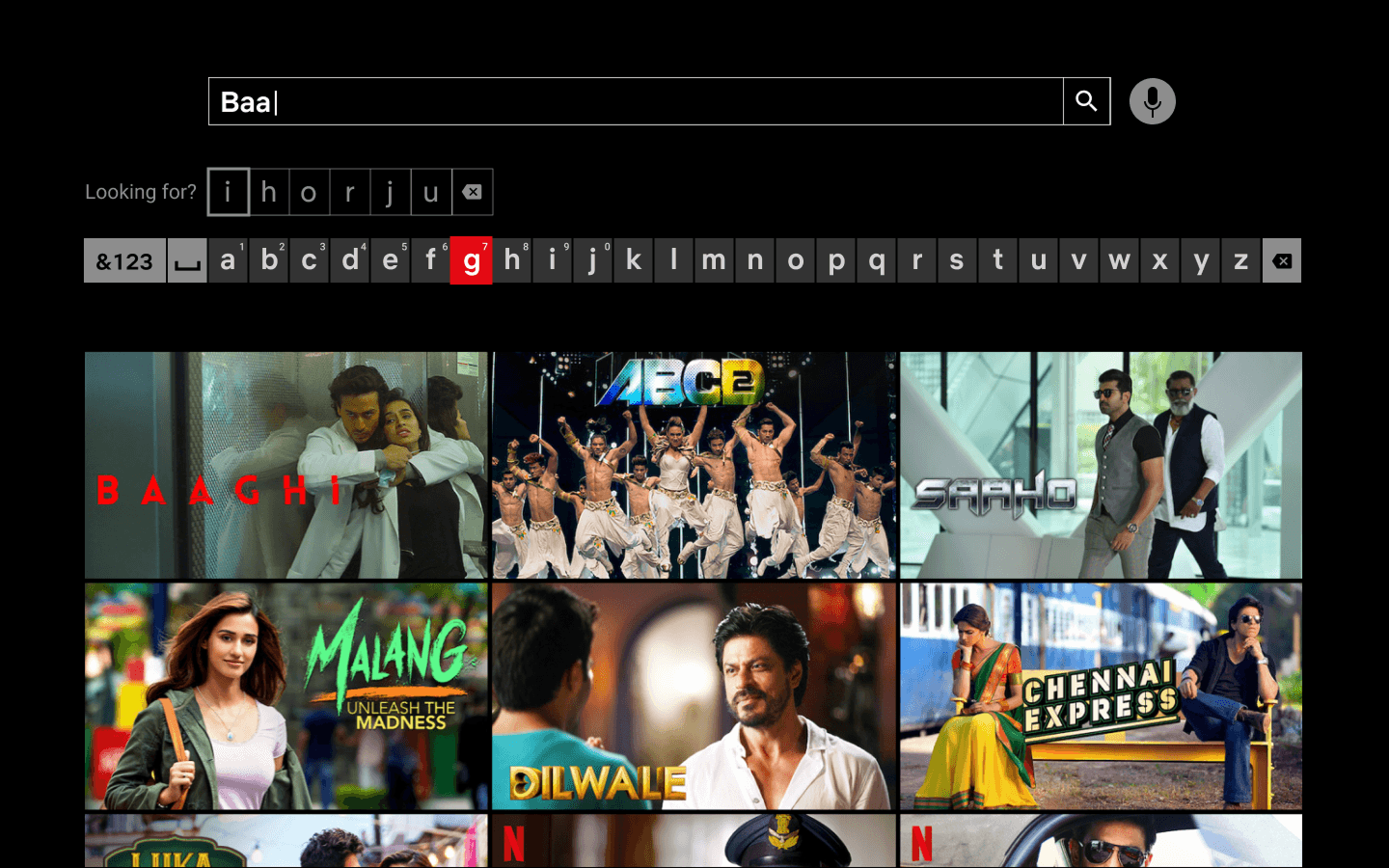
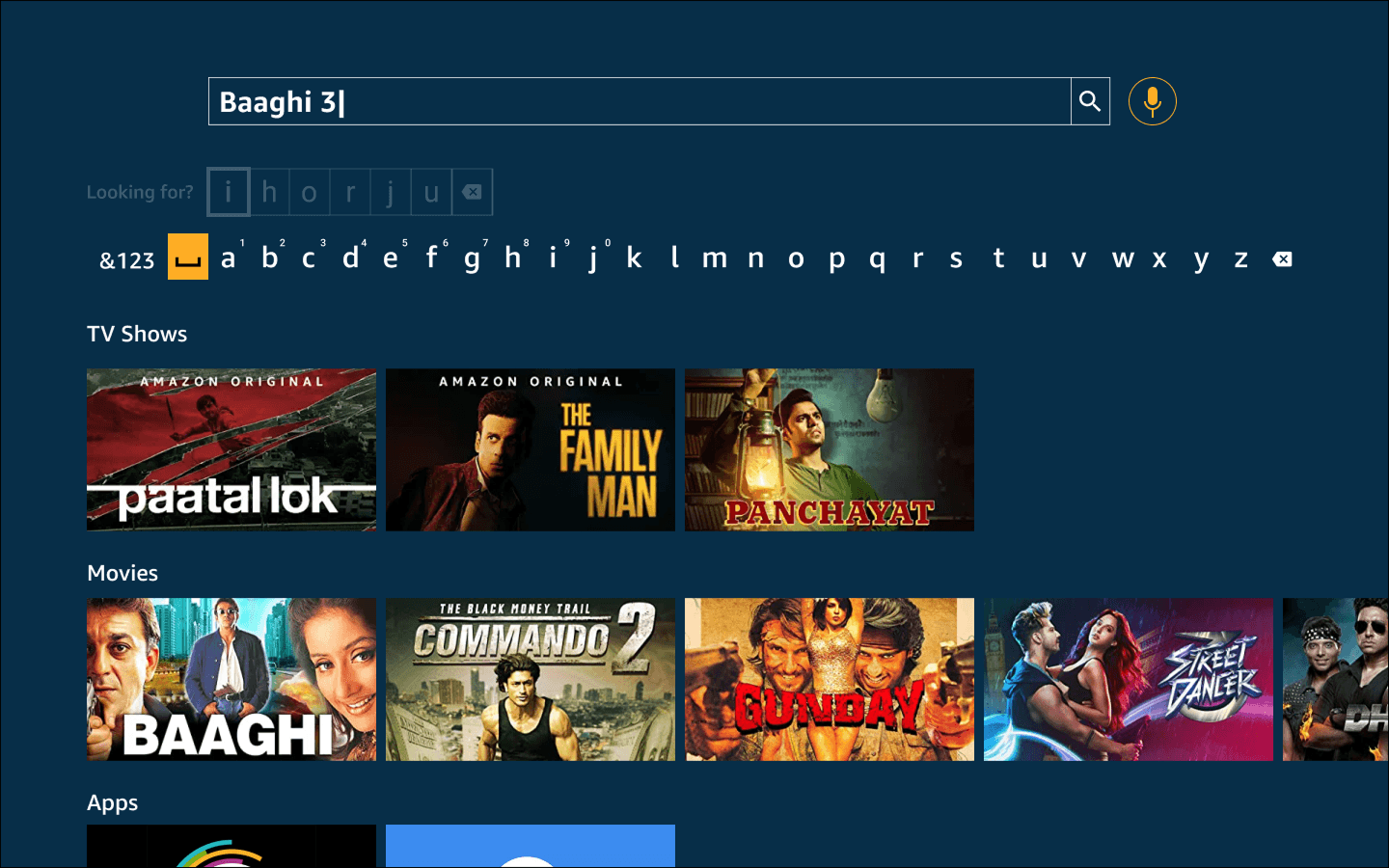
With the advent of smart TVs as a primary household media device, text input proved to be one of the most frustrating interactions. We proposed two novel text input methods as on-screen keyboards specifically for smart TVs and compared them against the conventional method.
Type
Academic Research Project
Timeline
January 2022 - January 2023
Role
HCI Researcher
This project was executed under the guidance of Dr Debayan Dhar, in collaboration with Chaitanya and Shirsha Biswas.
Preliminary Study
We conducted a preliminary study to identify problems faced
while typing on TV using a remote control to:
identify useful insights
identify valid problems
narrow down to a strong opportunity area.
Want to move directly to the HCI Research?
Problem Validation
We validated the initial problem area through the following:
Mutual Agreement
Online Review Analysis
Friends and Family Enquiry
Smart TV Usage
User Survey
We conducted an online survey by sending it out to participants who use Smart TVs.
43 Responses
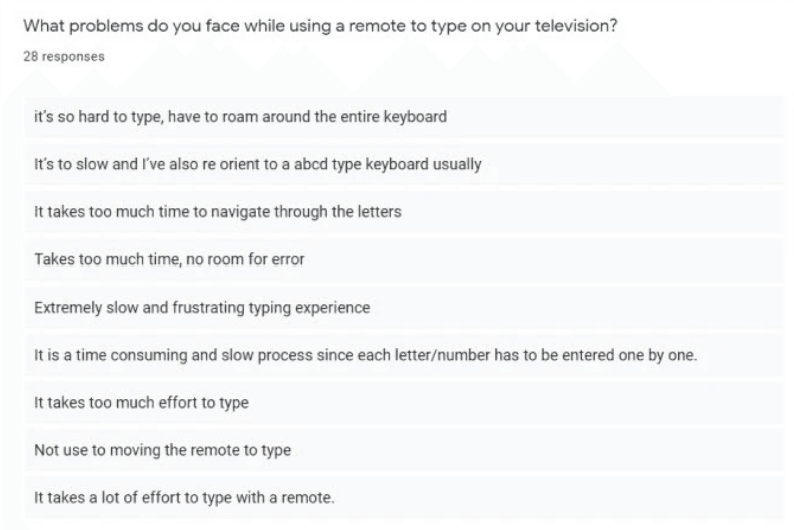
What problems do Smart TV users face?
What apps do they use that involve typing?
What do they like about the existing typing interactions?
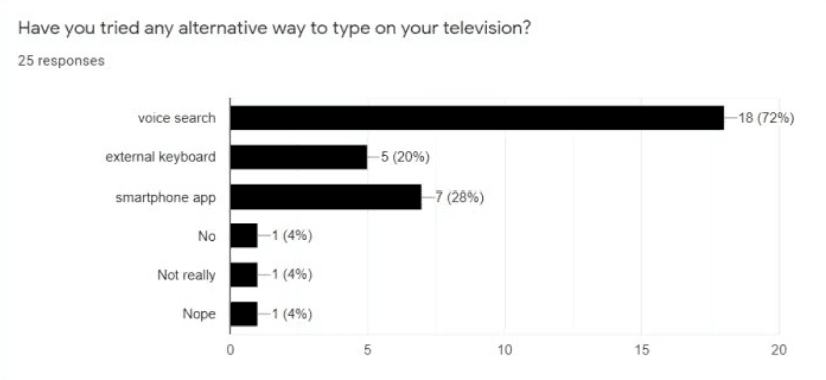
What alternatives to the remote are used?
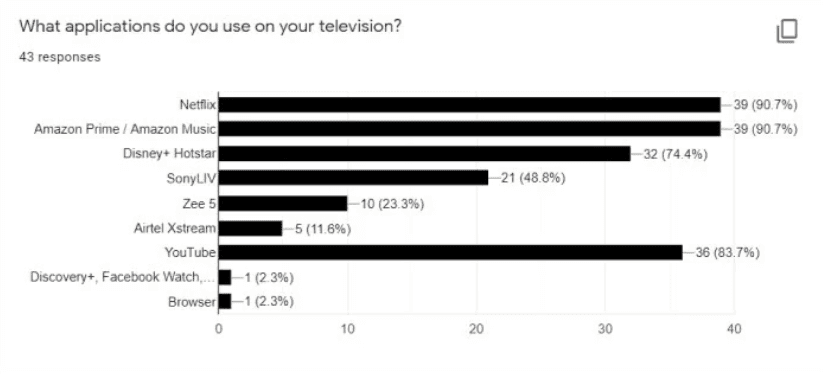
Actionable Insights
Most used apps: Netflix & Amazon Prime
Alternatives to the remote: Voice search, external keyboard, mobile apps
Problem 1: the process is too slow and frustrating
Problem 2: Focus needs to constantly shift between the screen and the remote
Problem 3: Buttons on the remote are small making it difficult to read
Problem 4: Difficulty in switching between remotes and devices
Problem 5: Lack of feedback results in overshooting letters while navigating
Problem 6: Difficulty while entering languages other than English
Field Study
We conducted an online survey by sending it out to participants who use Smart TVs.
7 Tests
User Observation
Contextual Inquiry
Semi-structured Interviews
Critical Incident Technique
Tasks
Type in username/password
Search for the given movie titles on Netflix and Amazon
Interview Questions
Introspection - likes, dislikes, preference.
Use of alternatives, specific scenario of usage
Environment

Remote/alternatives

Empathy Mapping
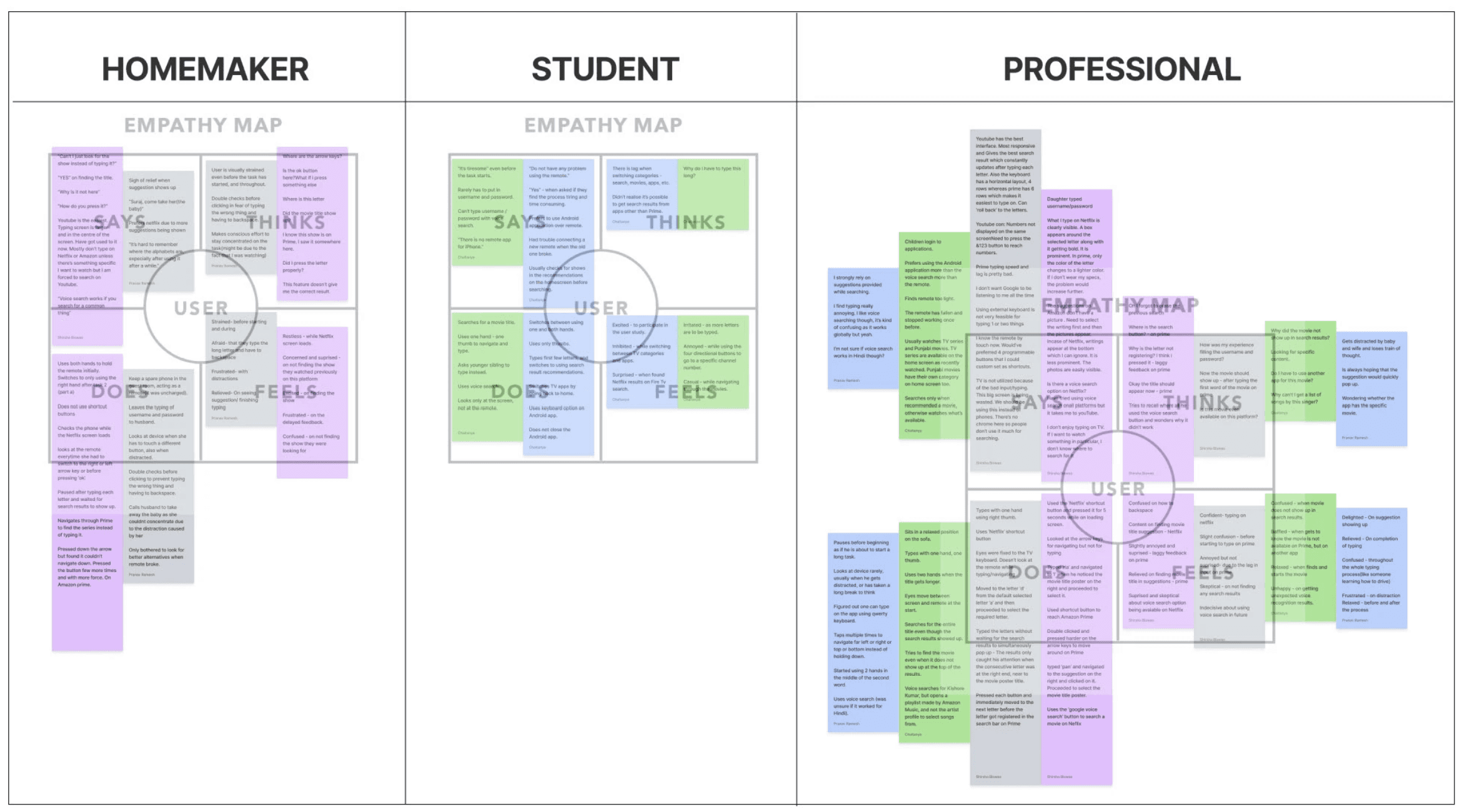
We identified 3 user groups based on their experience with technology and created empathy maps based on data gathered from the study to arrive at key insights and opportunity areas.
Pros & Cons List
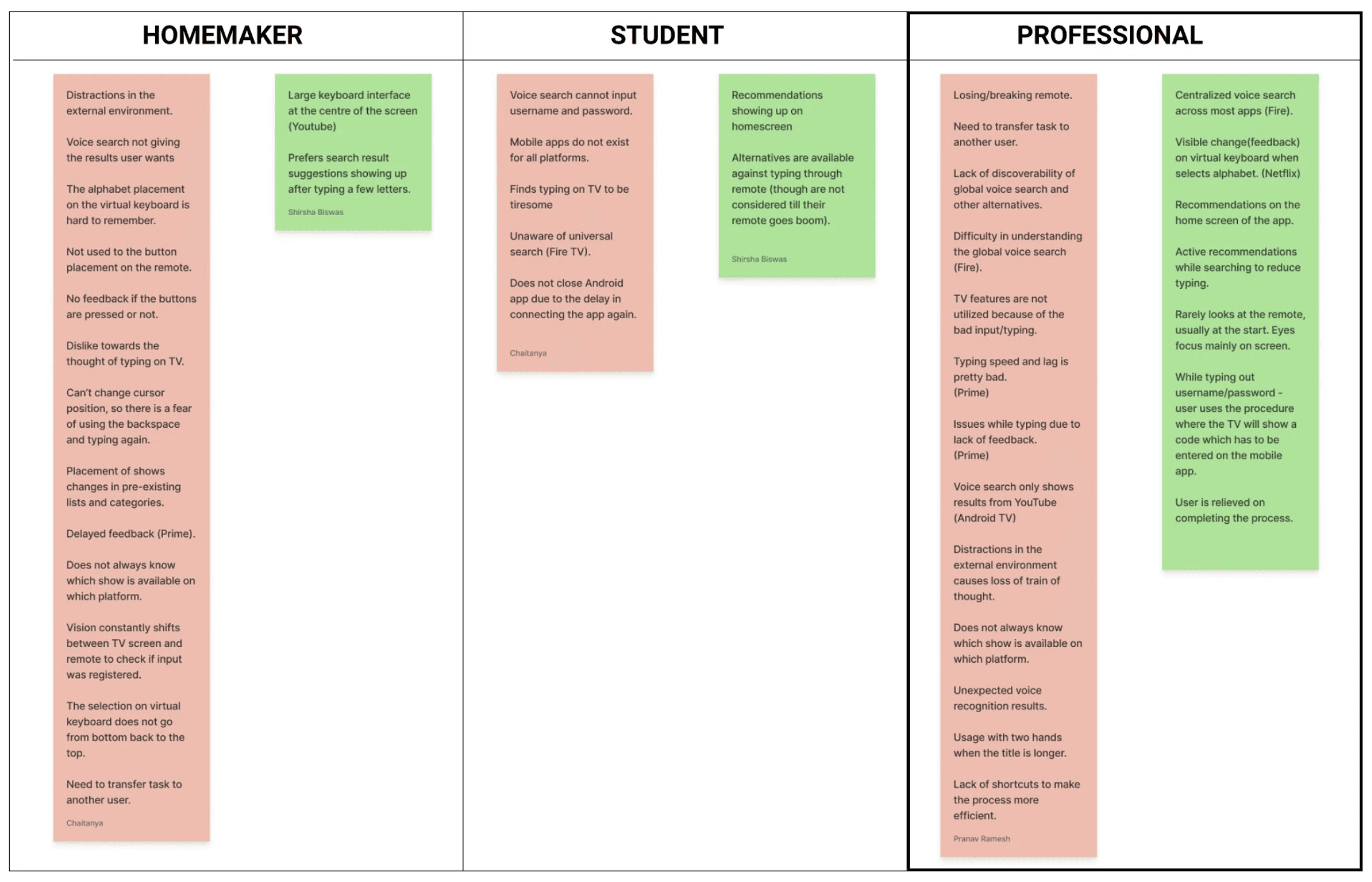
We aggregated the pain points and gain points from the study to create pros and cons lists.
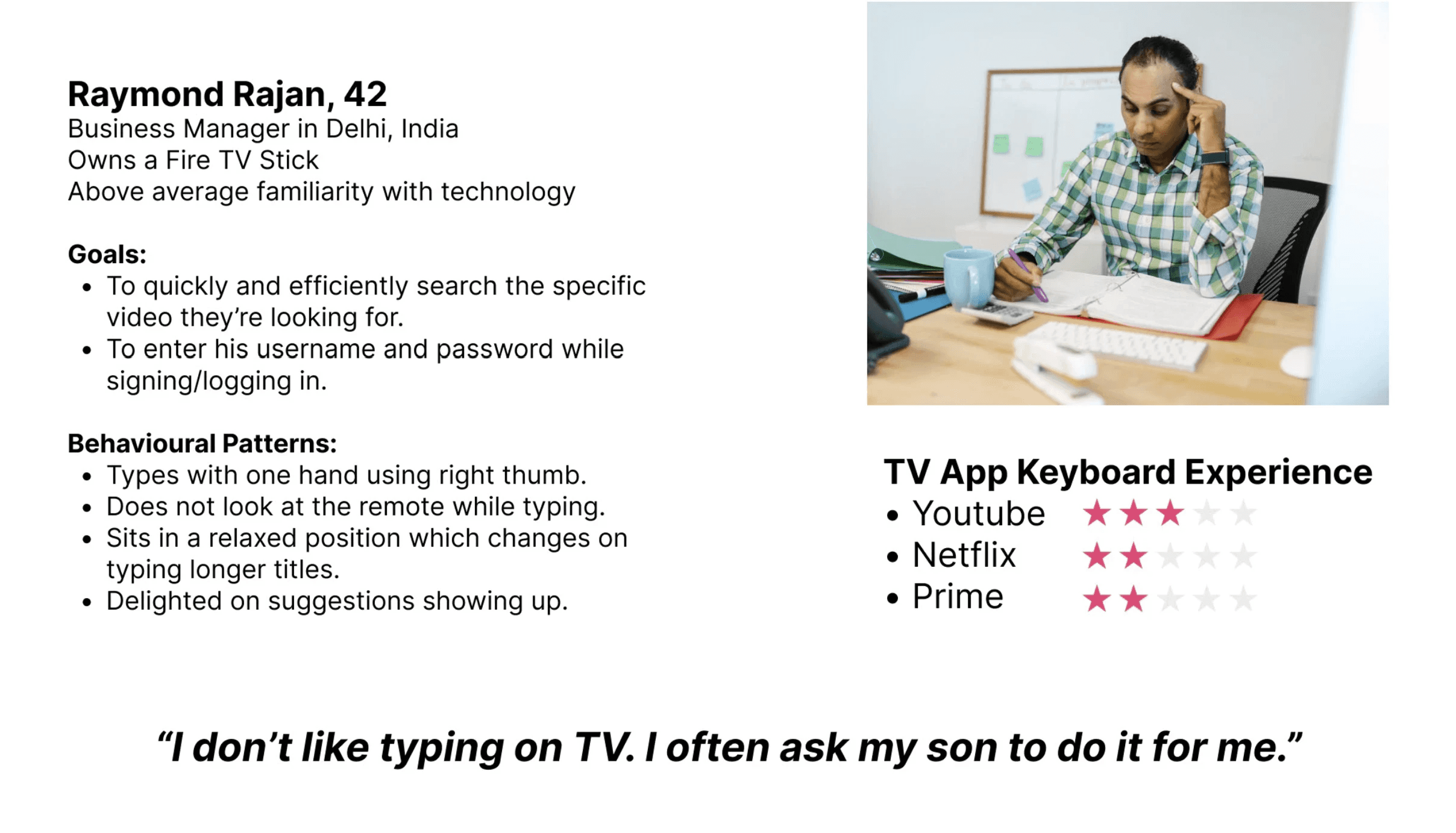
Resulting User Persona
The data collected via the preliminary research was leveraged to craft a user persona aiding in conceptualisation.
Journey Map
Scenario: Raymond is searching for 'Yeh Jawaani hai Deewani' on Amazon Prime.
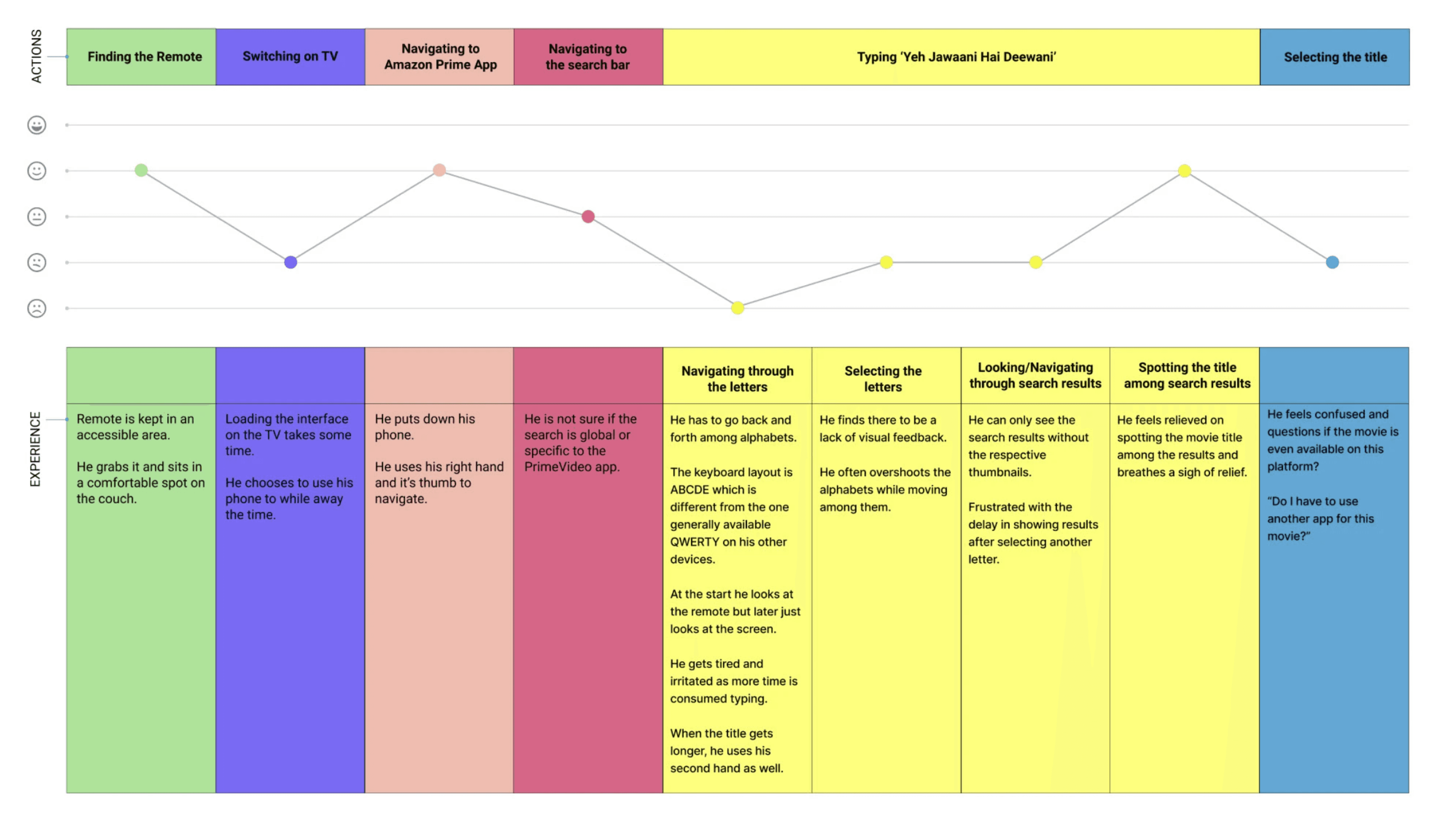
Key Insights
Users look forward to active search results to reduce typing.
Frustrated by slow typing speed and lag in or lack of feedback.
Lack of shortcuts decreases efficiency.
The focus remains on the TV screen most of the time, and not on the remote.
Most problems are faced while navigating through characters.
Opportunity Areas
Improve recommendation feature to reduce typing.
Improve feedback to be clear to the user.
Find possible shortcuts to increase efficiency.
Devise possible layouts to improve the movement through characters.
Redesigned Brief
To create a centralised keyboard for streaming applications to improve the experience of working professionals while navigating through the letters while typing on Smart TVs.
Ideation
This brief and persona was used to come up with and evaluate concepts (this process is explained under the Conceptualisation section).
To check out the preliminary ideation process, have a look at the preliminary case study:
Before we move on to the details of the literature review…
Smart TV Landscape Study
We looked at the evolution of TVs into Smart TVs:
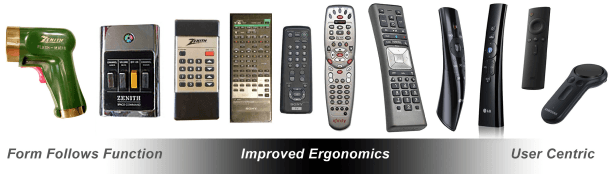
1st Generation: Bulky black and white analogue TVs with limited channels and input sources. Remotes were uncommon and used for basic functionality - they moved from wired technology to phototechnology.
2nd Generation: Digital colour TVs - increased channels and input sources, file traversal, numbered security locks. Remotes moved to infrared technology. This led to the birth of remotes with directional keys.
3rd Generation: The inclusion of the internet to TVs presented the need for improved navigation and efficient text input due to internet browsing and app downloads. Alternative remotes - point & click, mini-keyboards. This generation marked a shift from numeric to alphanumeric text input.
4th Generation: A paradigm shift from TVs operating as channel dominant to OTT streaming dominant. Text input changed from being a trigger function of changing channels to being an input device for typing sentences to search for media, remotes did not adapt to this change.
Keyboard Study
General Parameters:
Image
Keyboard Type
States:
Unfocused
Focused
Active
Selected
Disabled
Characters
Numbers
Symbols
Alphabets
Environment:
Function Keys
Cursor
Search/Text Box
Starting Position
Key Press (long, double)
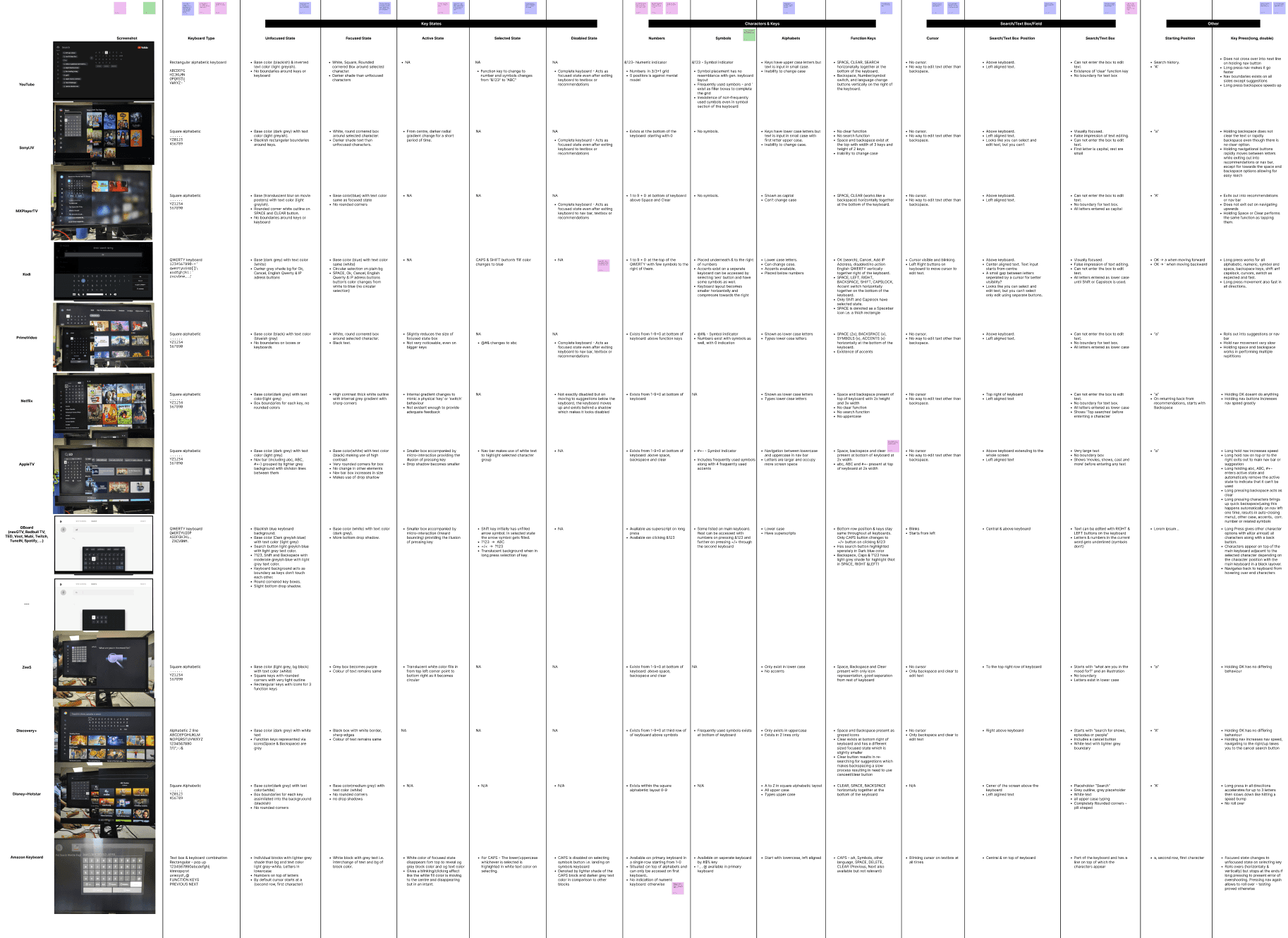
Actionable Insights
Although there is a lack of standardisation of on-screen keyboards, OTT platforms seem to be moving towards the square alphabetic keyboard
Apart from Amazon Prime & Apple TV, all other major OTT Apps had a single keyboard
Most apps have a ‘fill’ for their active state with square blocks
Apart from YOUTUBE (and google keyboard), All keyboards have numbers in the primary keyboard
Making use of effective micro-interactions would aid user understanding of the current state as well as changes between states
Lack of cursor results in difficulty in editing text, leading to forced clearing or backspacing to retype
Literature Review
On reviewing literature from peer-reviewed journals and conferences from the past 11 years (between 2011-2022), it is evident that the study of text input methods is a field that has received much attention. However, most works are concentrated around mobile devices. Out of the few works that report studies specific to TVs and smart TVs, most evaluated and compared the usability and learnability of text input methods alongside metrics such as text input speed, number of moves, and error rates.
Research Questions
We arrived at 2 research questions that motivated the literature review.
Research Question 1
What are the different keyboard layouts for text entry on smart TV in terms of character arrangement, character navigation, usability heuristics?
Research Question 2
What are the commonalities and distinctions in device interaction between smartphones and Smart TVs for text entry in terms of input method, corresponding feedback and user behaviour?
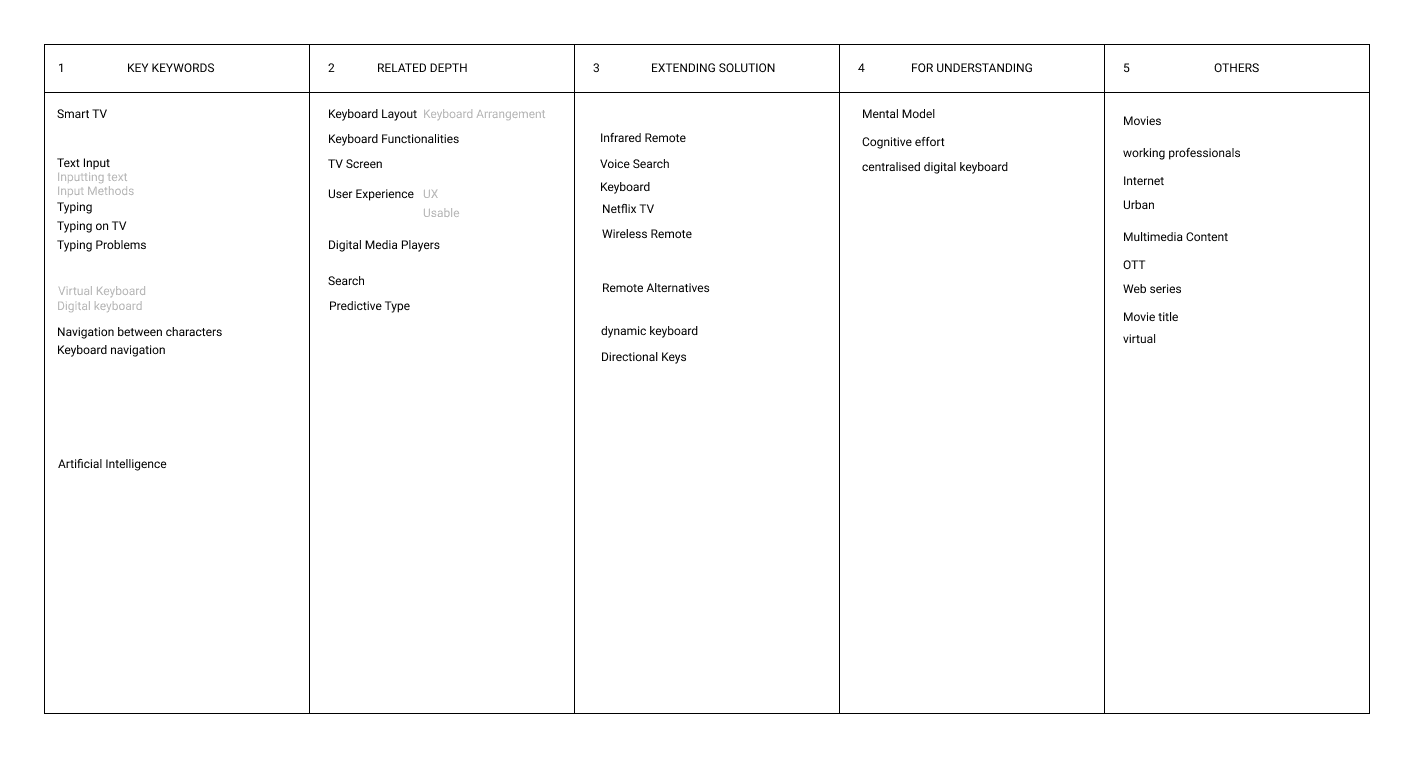
Keyword Search
We created a keyword table to systematically select keywords guiding the selection of material for the literature review.
Thematic Analysis of Literature
We narrowed down the scope of the literature review from 100+ materials to 10 on the basis of inclusion criteria, abtract analysis and in-depth reviewing. These 10 materials were then closely analysed and dissected via thematic analysis.
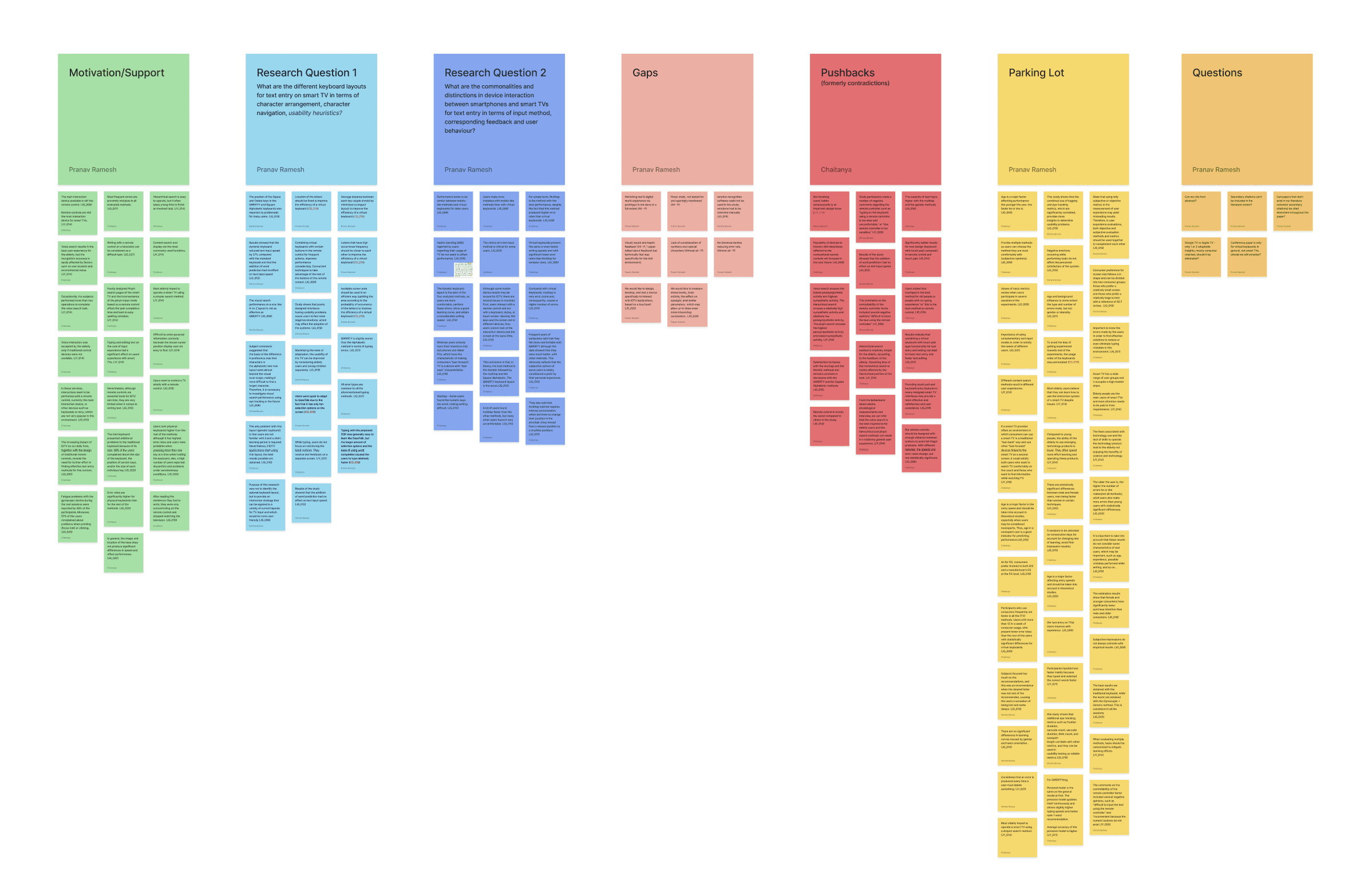
Custom Data Visualisation Diagram
We mapped the information derived through reviewing relevant literature to understand the subjective and objective data of remotes, virtual keyboards and alternatives, this aided in comprehending the vast ocean of information and segregating them into meaningful topics.
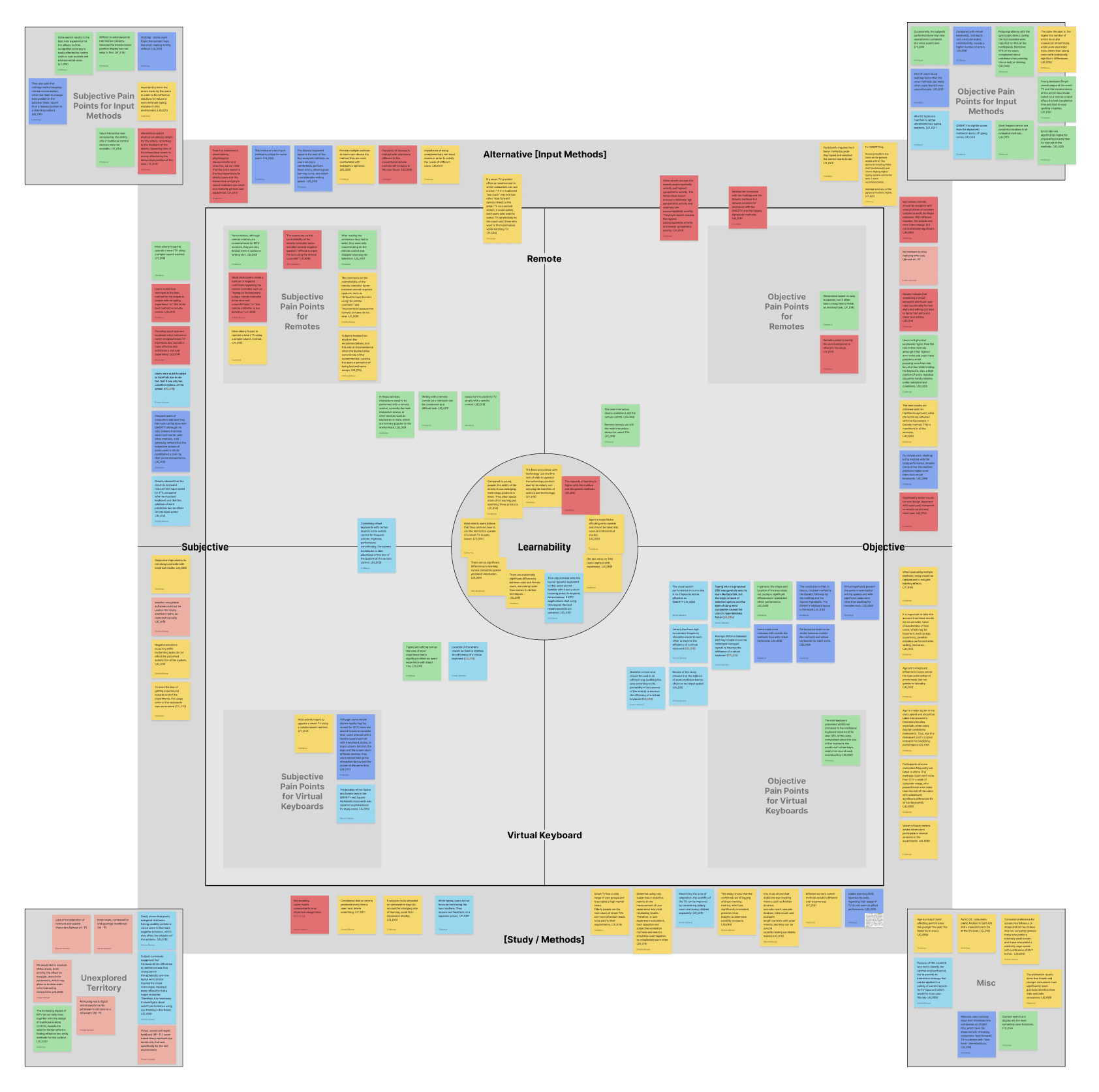
Findings from the Literature Review
Keyboards haven’t been designed for smart TV interaction, rather they are identified from pre-existing devices(mobile phones, computers, etc.) and adopted for smart TV text input.
Inevitably the primary interaction device available for smart TVs is still the remote control and users want to control smart TVs simply with a remote control despite certain alternatives proving to be better in comparison.
The smart TV is a device with “lean back” characteristics as opposed to “lean forward” devices such as mobile devices and keyboards.
The keys and the screen are in different devices, making it impossible for users to look at the interaction device and the screen at the same time.
Typing and editing text significantly affect users' experience with smart TVs.
Some studies incorporated a multi-session approach to understand the changing rate of learning.
User efforts could be decreased significantly for a variety of input methods via the usage of language prediction.
Gaps in Literature - Paving the Path Forward
Literature highlights limited research regarding character text prediction for text input in the context of smart TVs. Apart from this, it also highlights that novel text input methods were hardly designed keeping in mind the context of smart TVs specifically. To address the findings, the study's main goals are to compare the effect of the proposed text input methods, i.e., 2-Row Predictive keyboard and Quad-Directional keyboard with each other and the existing Square Alphabetic keyboard and to substantiate usability and user preference across the three keyboard designs.
Thematic Ideation
Outcomes from the preliminary study, keyboard study and literature review were made use of to identify themes to begin the ideation process:
Screen+remote behaviour
"Lean-back" environment
Layout & arrangement
Special characters
Cursor behaviour
Feedback mechanisms
Error reduction
Virtual keyboard parameters
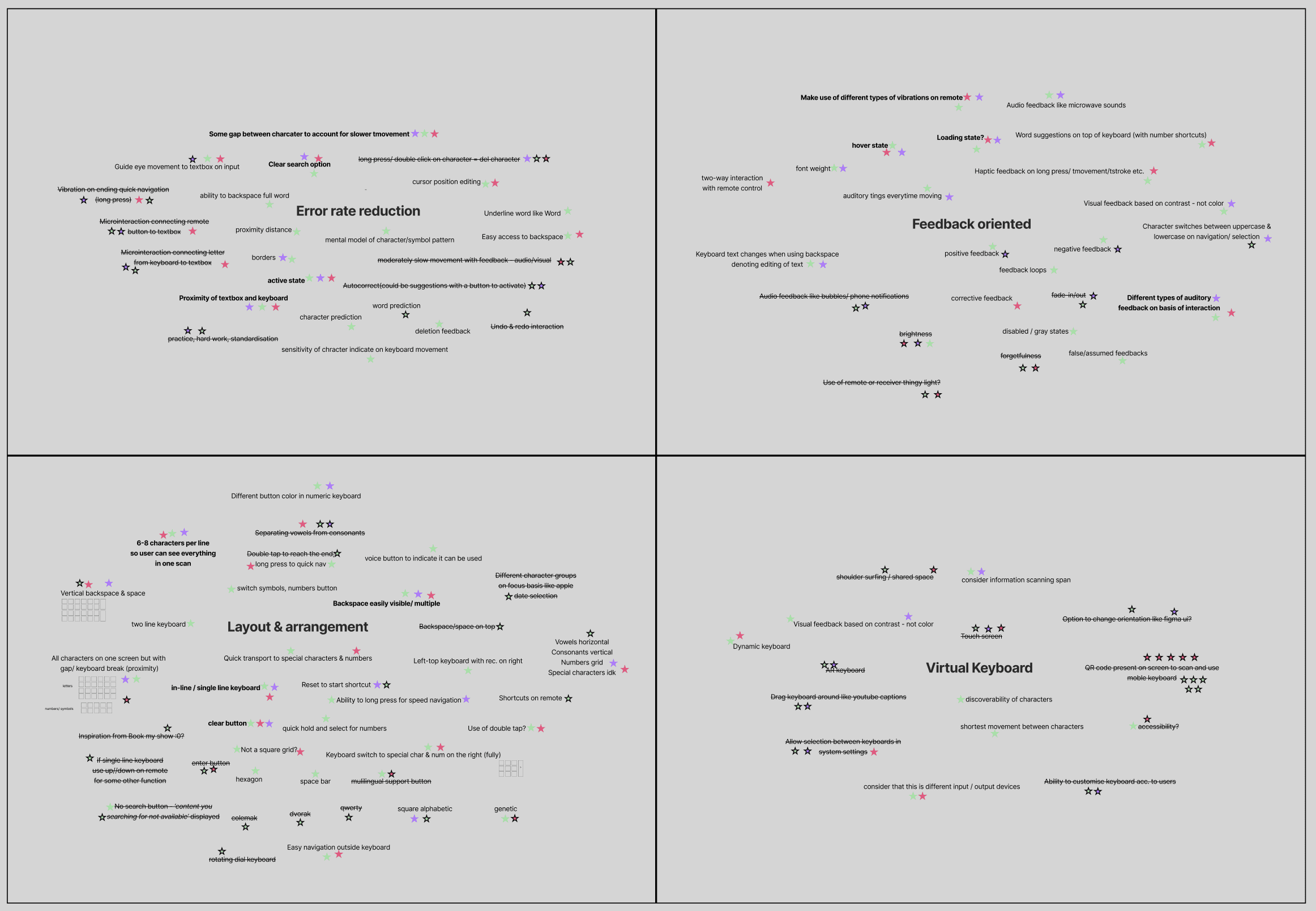
Thematic Ideation & Evaluation Diagram
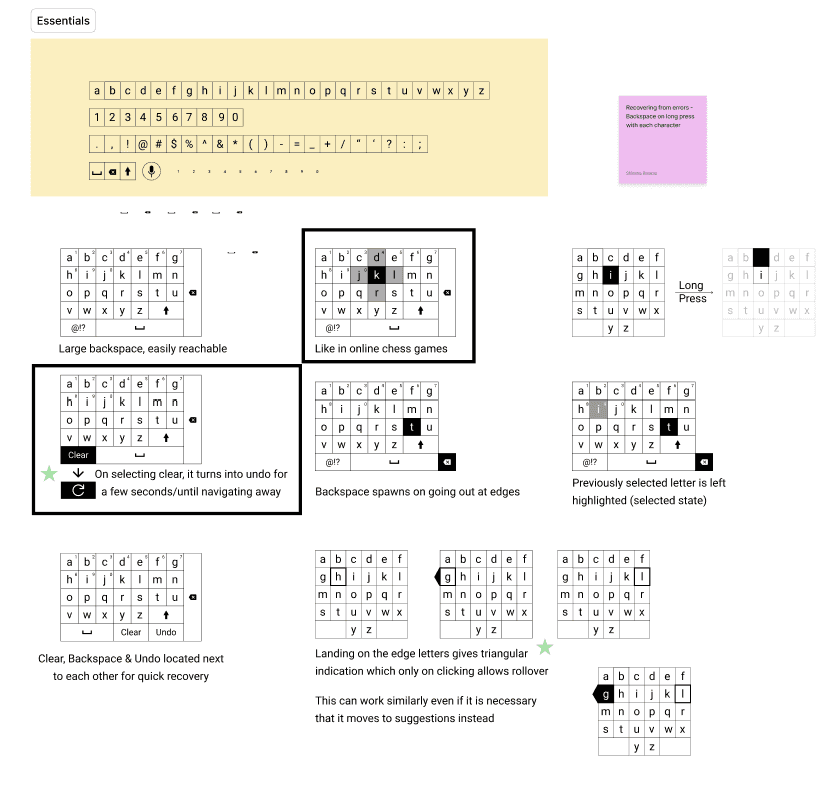
Ideation along 'Error Reduction' theme
Idea Evaluation
All 3 team members individually voted for ideas along each theme, This evoked rigorous discussions and arguments resulting in the evaluation of generated ideas. Prospective ideas were then combined and refined to low-fidelity concepts, where the process was repeated.
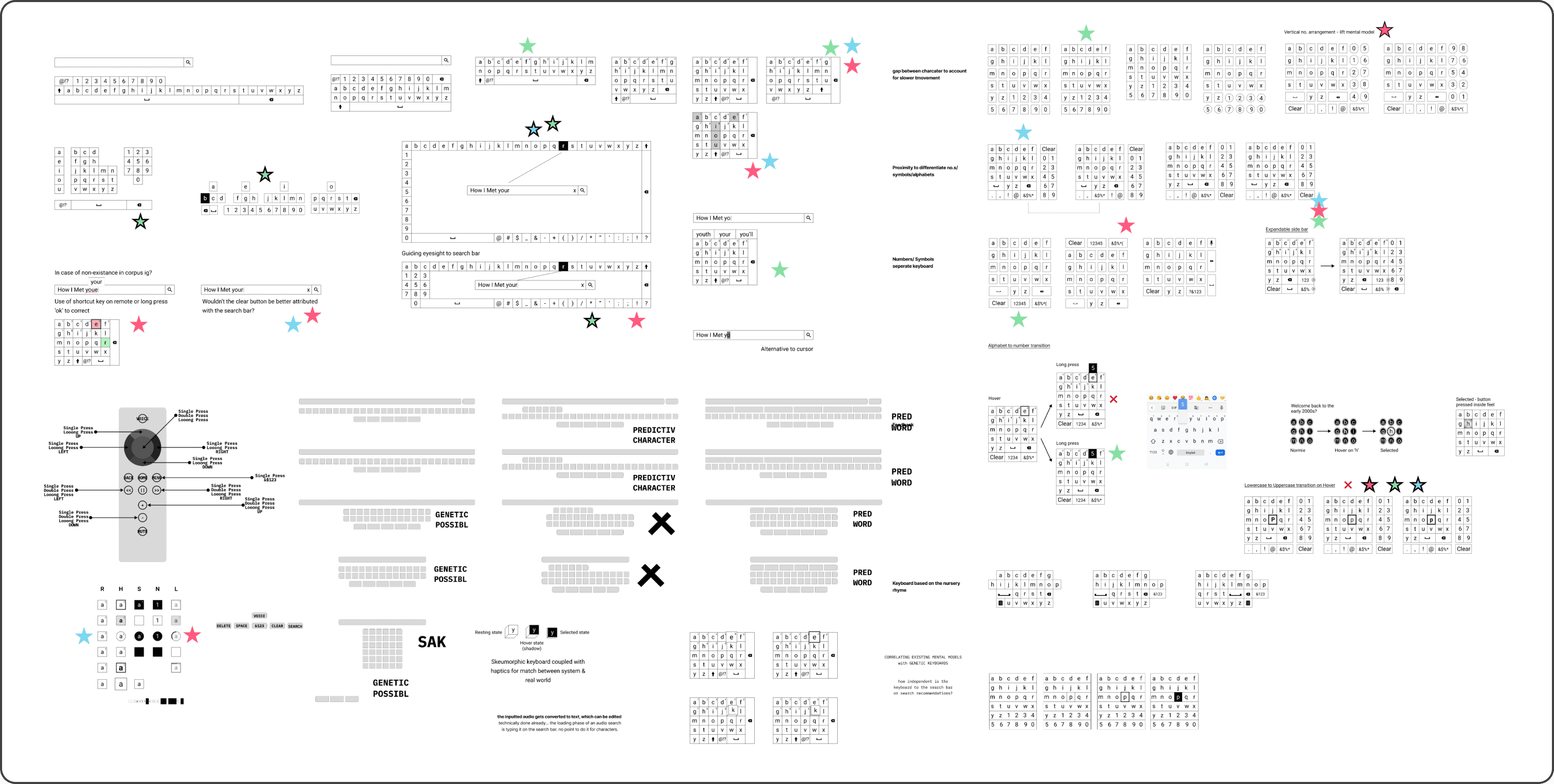
Concept 1
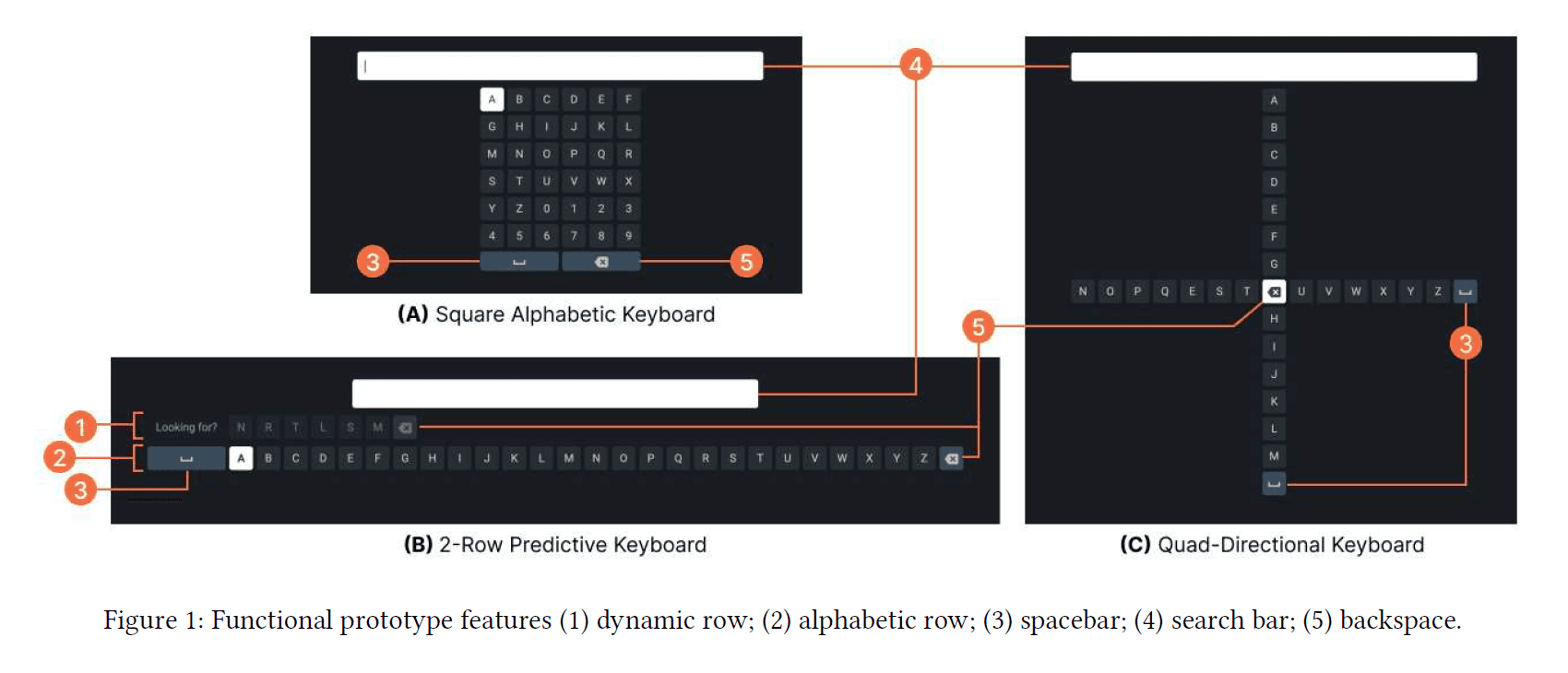
2-Row Predictive Keyboard
Concept Iterations
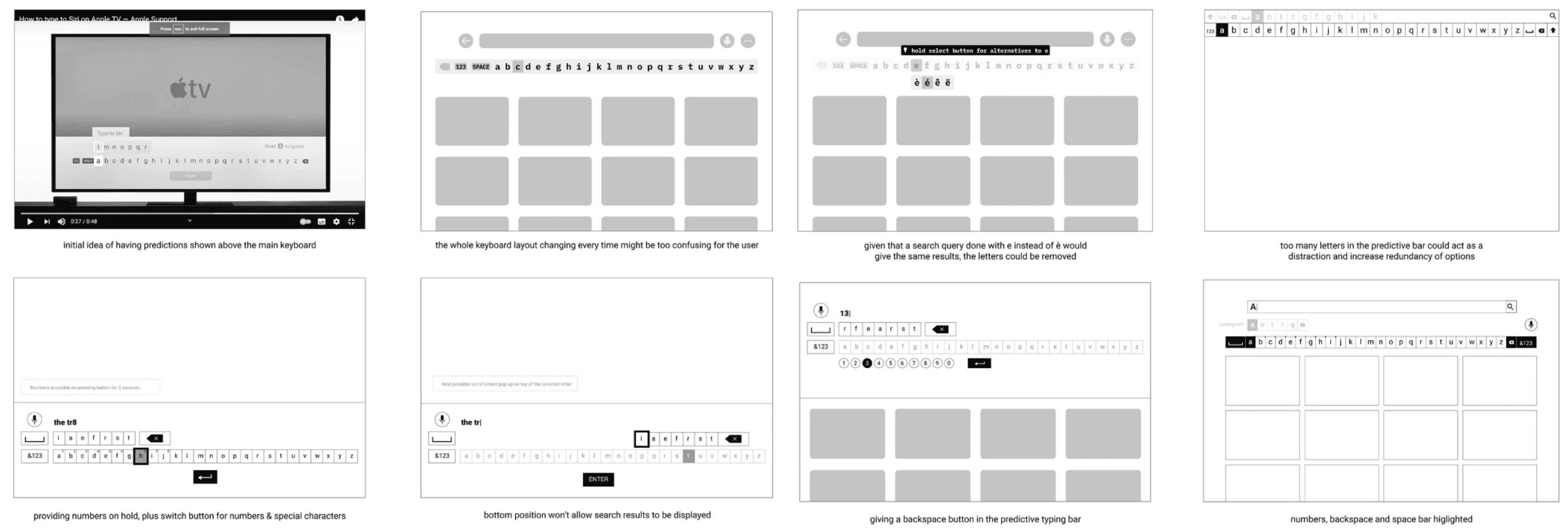
The Concept

Layout
This keyboard contains two rows, the dynamic and the alphabetic. The bottom row displays the characters alphabetically because we believe, as opposed to mobile phones and computer devices, in the context of smart TV, users might find it difficult to recall the position of letters.
Motive
This design explores the potential benefit of combining character text prediction and dynamic keyboard mechanisms to reduce user efforts while keeping in mind the “lean back” characteristics of the unique smart TV context wherein the user is in a resting state.
Dynamic Row
The dynamic row is restricted to 6 predictive characters as a trade-off point to afford the maximum probability of prediction of the target character while minimizing the time taken to scan and navigate to the target character. The six characters in this row are the most statistically probable characters arranged from left to right per an n-gram and frequency-based predictive algorithm run on the corpus.
Remote Navigation
Users can use the up and down directional buttons to navigate to the first character on the adjacent row. Users can also long-press the left and right directional buttons to navigate to a key quickly and avoid multiple presses.
Concept 2
Quad-Directional Keyboard
Concept Iterations
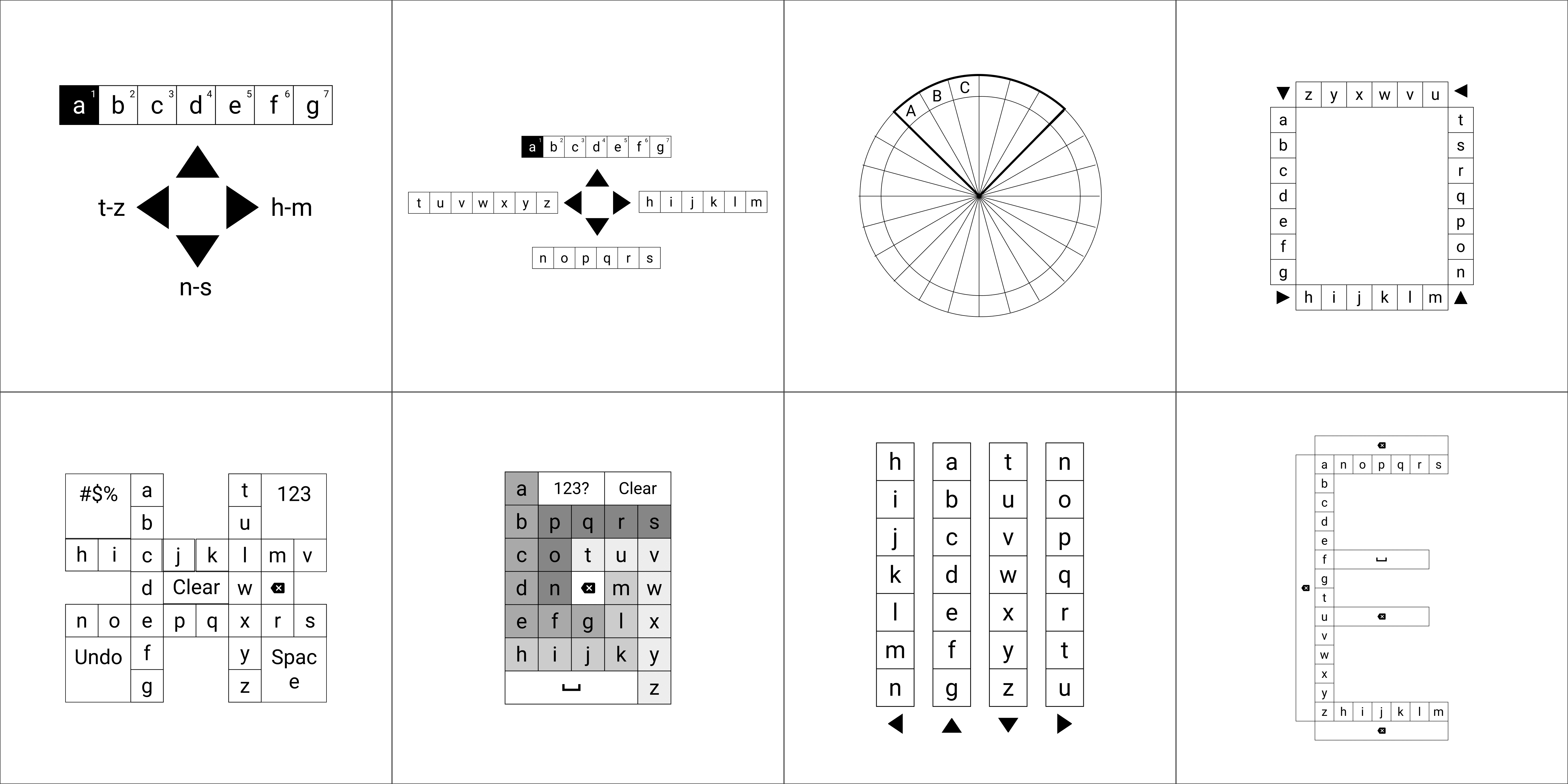
The Concept
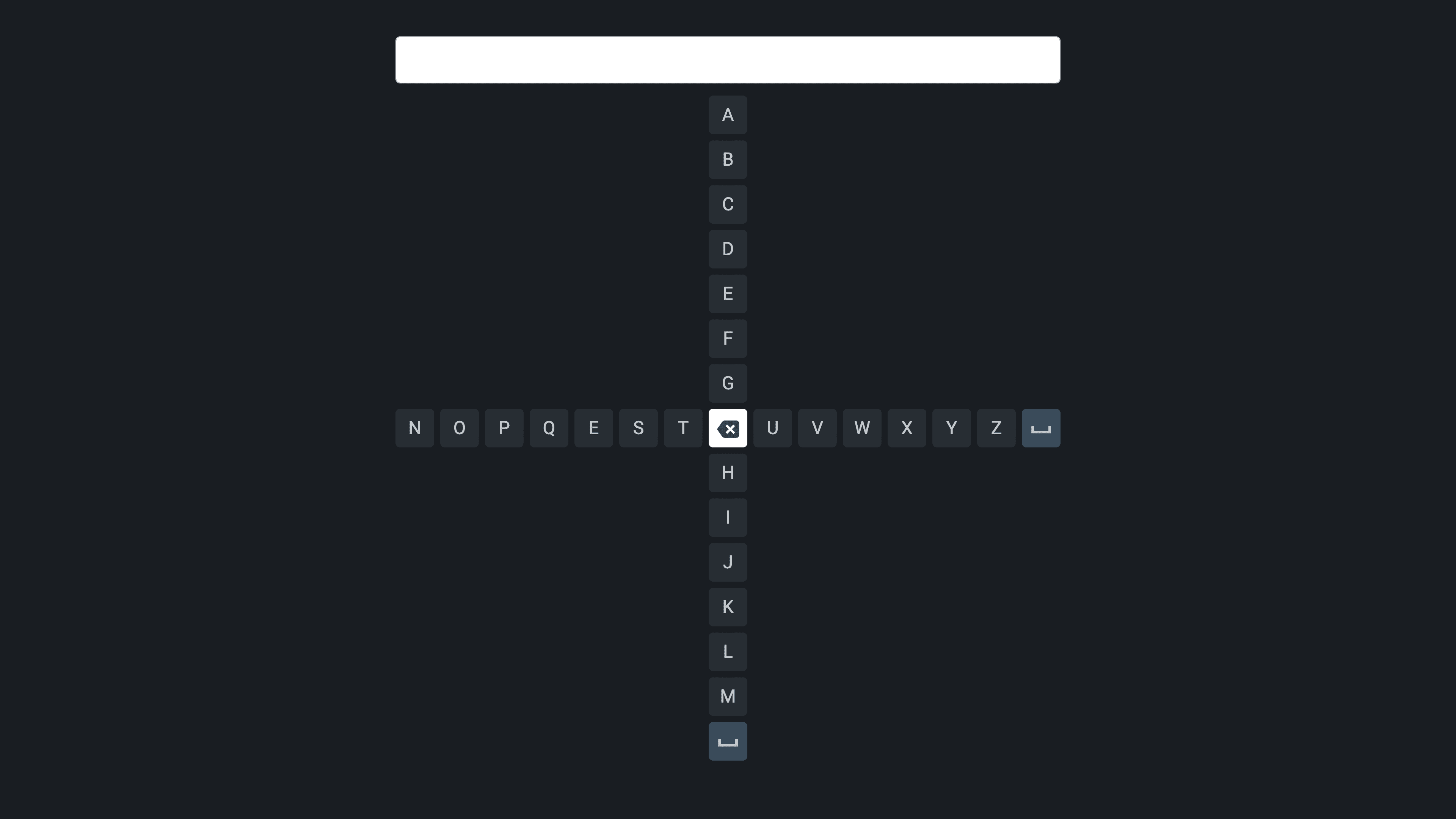
Layout
The keyboard is divided into two strings of characters that intersect to form a "+" sign. The backspace key divides the keyboard into four sections with seven keys each.
Motive
The keyboard was spatially divided into layouts mimicking the four directional buttons on the remote.
Remote Navigation
While the focused key is located in the vertical string, the user can directly jump to the left or right section of the keyboard with the left or right directional buttons. Similarly, the user can directly jump to the top or bottom section of the keyboard from any position on the horizontal string.
The Conventional Keyboard
Square Alphabetic Keyboard
This keyboard follows a 6*6 grid layout wherein the characters are arranged in an alphabetic
order followed by numbers. The novel text input methods are compared against this keyboard as the Square
Alphabetic keyboard layout is the most widely adopted in OTT platforms for smart TVs.

The Experiment
The goals of the experiment are two-fold:
To compare the effect of the proposed text input methods, i.e., 2-Row Predictive keyboard and Quad-Directional keyboard with each other and the existing Square Alphabetic keyboard
To substantiate usability and user preference across the three keyboard designs.
Secondary Objectives
Understanding participant experience with smart TVs
Understanding participant experience with OTT platforms on smart TVs
Understanding participant experience & behavior regarding typing on smart TVs
Understanding participant expertise/familiarity & bias towards existing on-screen keyboard designs
Examining Experiment Design from Literature
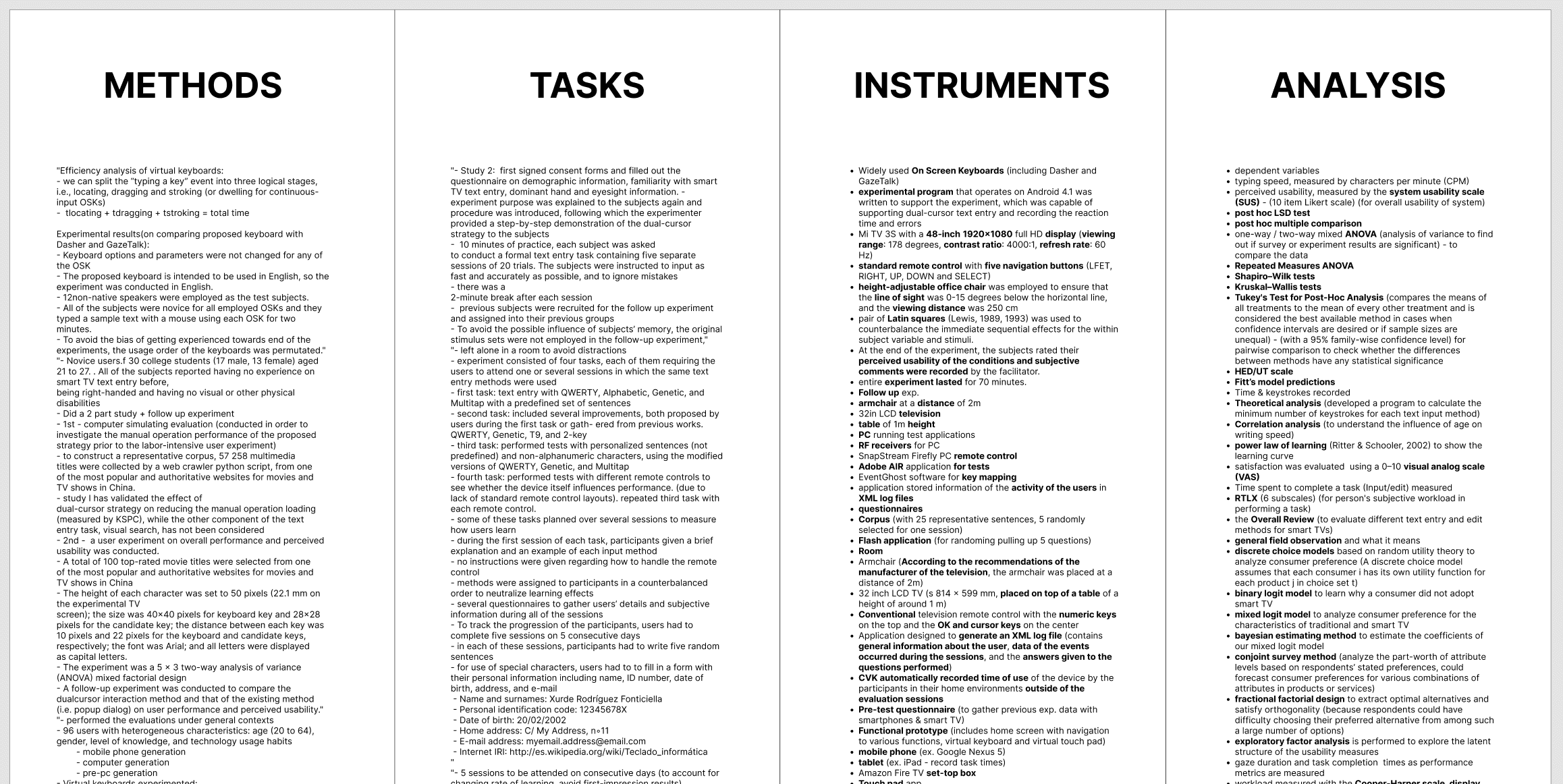
We broke down the experiment design conducted in examined literature to understand how to navigate our study method, tasks, instruments and analysis techniques.
Functional Prototypes
Concepts for the two novel text input methods have been limited to 2D on-screen keyboards controlled via a remote control with four directional buttons (left, right, up, and down) and a selection key at the center. Functional prototypes of the three keyboards were developed using HTML5, CSS, and JavaScript

Variable Mapping
Going through past literature gave us a comprehensive idea of the different variables that we might need to consider and incorporate into our study.
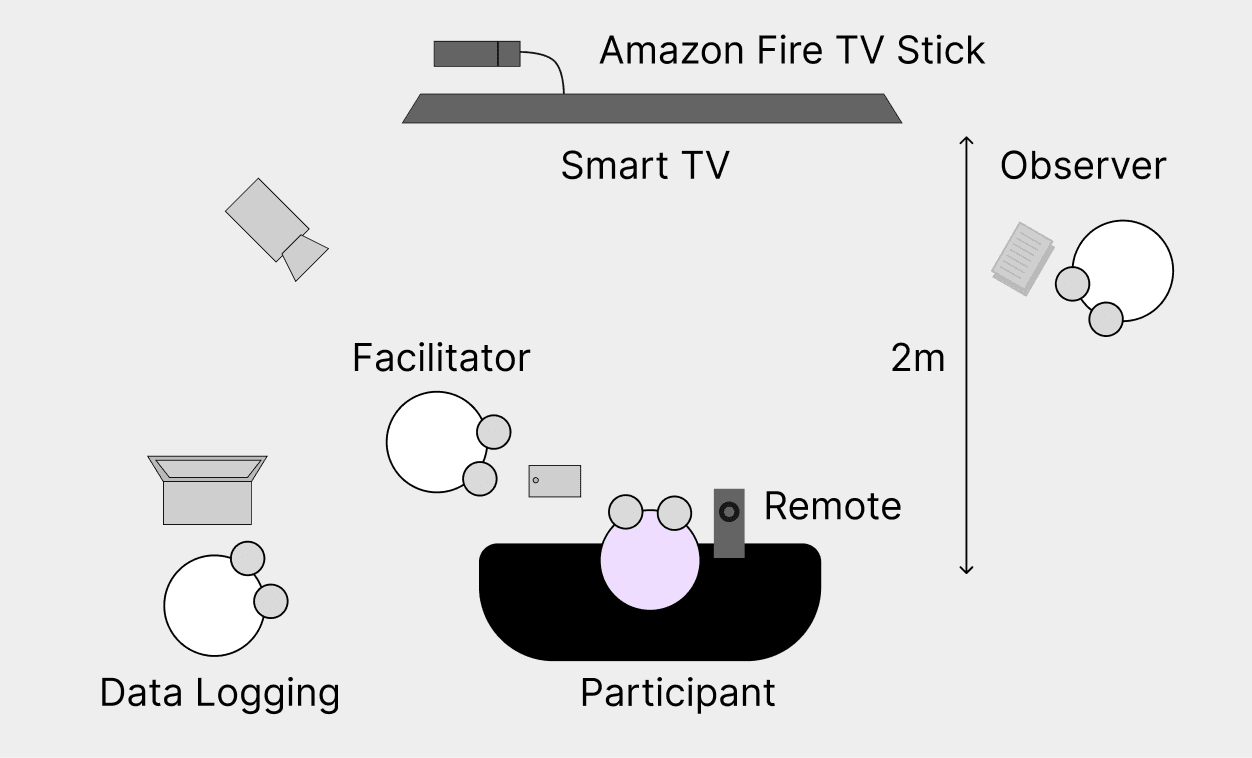
Preliminary Tests
The proposed experiment design was tested out with 4 participants resulting in the following key takeaways.
Key takeaways
Eliminating unnecessary questions and tasks, resulting in quicker test sessions.
Streamlining execution of the experiment to ease participant wait time and session time.
Shift from online SUS score filling to paper-based filling for efficiency.
Strong participant briefing making them feel comfortable, opening them up to conversation and pushing for honest opinions.
Eliminating any preference or performance biases due to nature of experiment design.
Participants
24 participants with prior experience of using a smart TV were recruited.
The participants were Indians and college-going students.
They were aged between 18 and 34; the majority were 18-24 (79.16%), while the rest were 25-34 (20.83%).
41.66% of the participants were men, while the rest were women.
8 out of 24 participants use smart TVs more than once a day.
In terms of expertise while typing on smart TVs, a good spread of novice (9), intermediate (8), and expert (7)
proficiencies were recorded.
Experiment Procedure
A single session mixed method research approach was adopted.
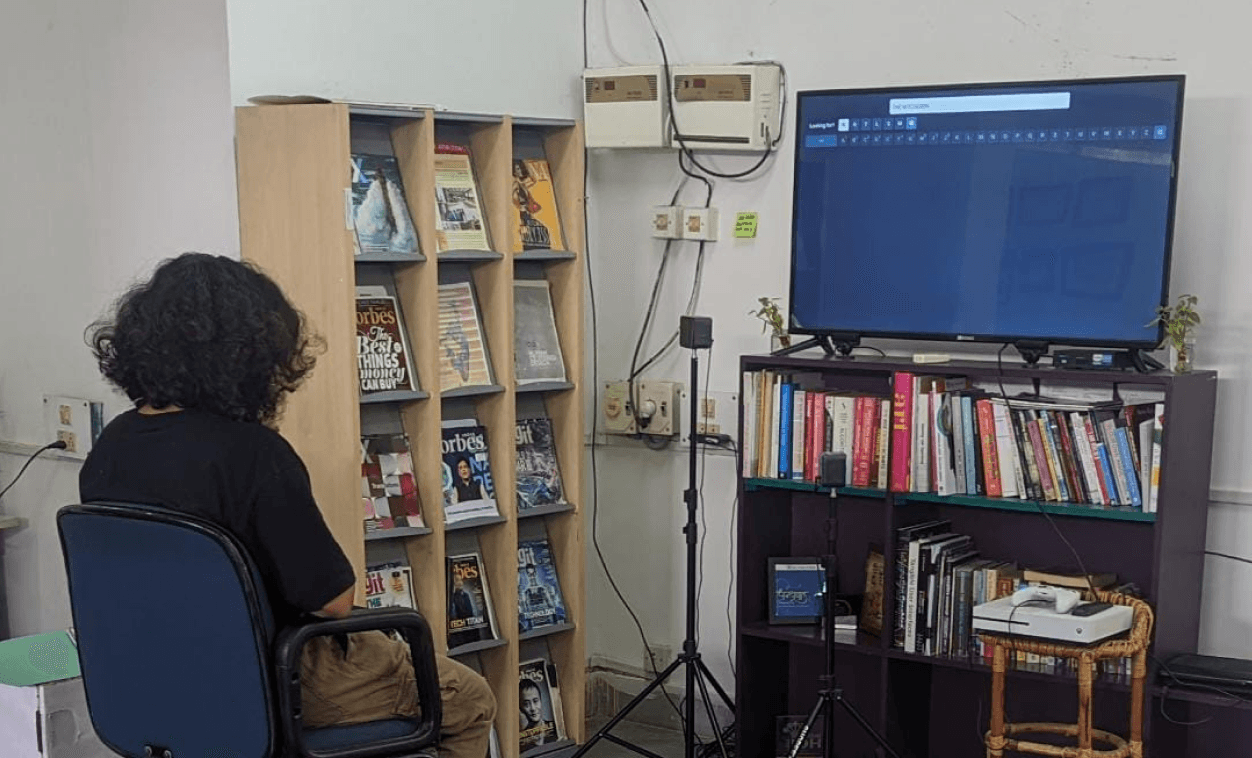
Participant Briefing
The session began with a brief explanation of the experiment without informing the participants about the goal of the experiment to avoid any bias.
Priliminary Survey
A digital pre-task questionnaire to retrieve their demographic data and understand their experience and behavior with regard to inputting text on smart TVs.
Experiment Tasks
The functional prototypes of the three keyboards were administered to the participants, the order of which was randomised. The experiment was divided into two phases. The first phase involved showing each keyboard to the participants one by one and
recording their subjective impressions based on their observation. Post this, I gave a quick demonstration
of the keyboard's interaction strategy and participants were given 30 seconds to interact freely with the prototypes using
a remote control. In the second phase, the participants were instructed to type the movie title "THE WITCHER" using
each of the prototypes. This process was repeated for all three keyboards.
System Usability Scale + User Preference
A SUS questionnaire was administered post-task completion with each keyboard and keyboard preference among the three prototypes was asked to each participant.
Analysis & Results
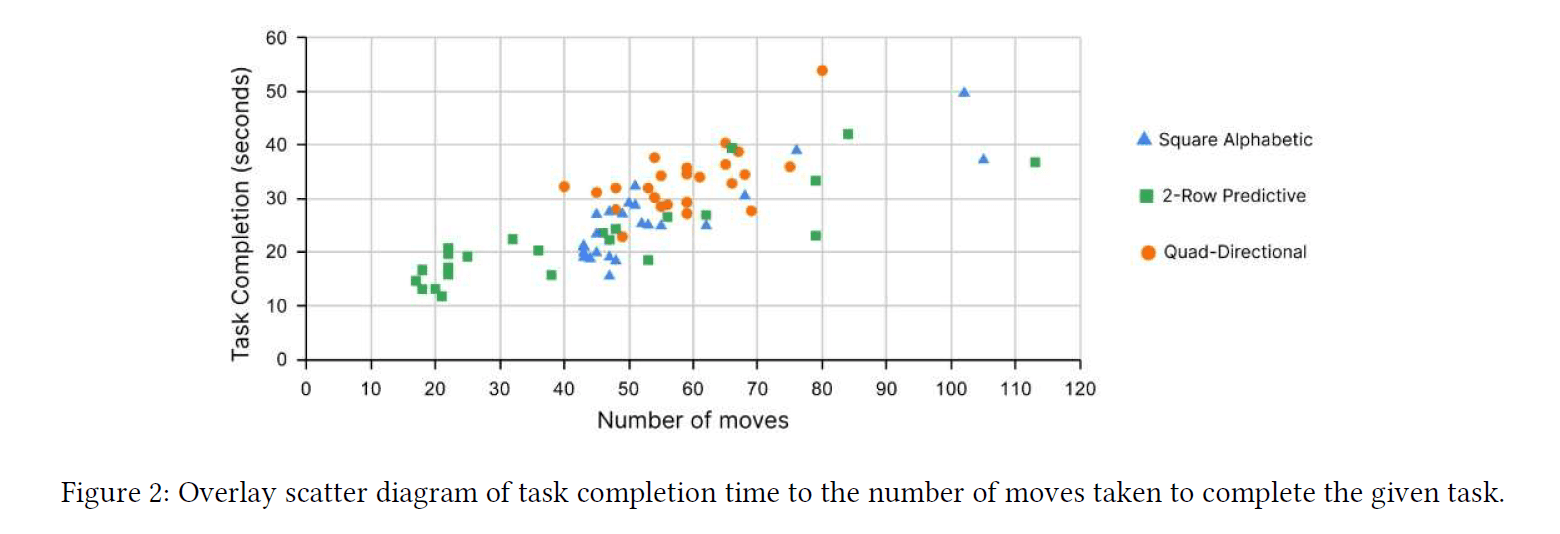
Objective Analysis
Task completion time - The total time taken to complete the task of typing the movie title was measured in seconds
Number of moves - the total number of moves taken in navigation to complete the task of typing the movie title
System Usability Score
User Preference - participants were asked which keyboard they prefer
Errors - errors are recorded via counting the usage of the Backspace key.
Task Completion Time
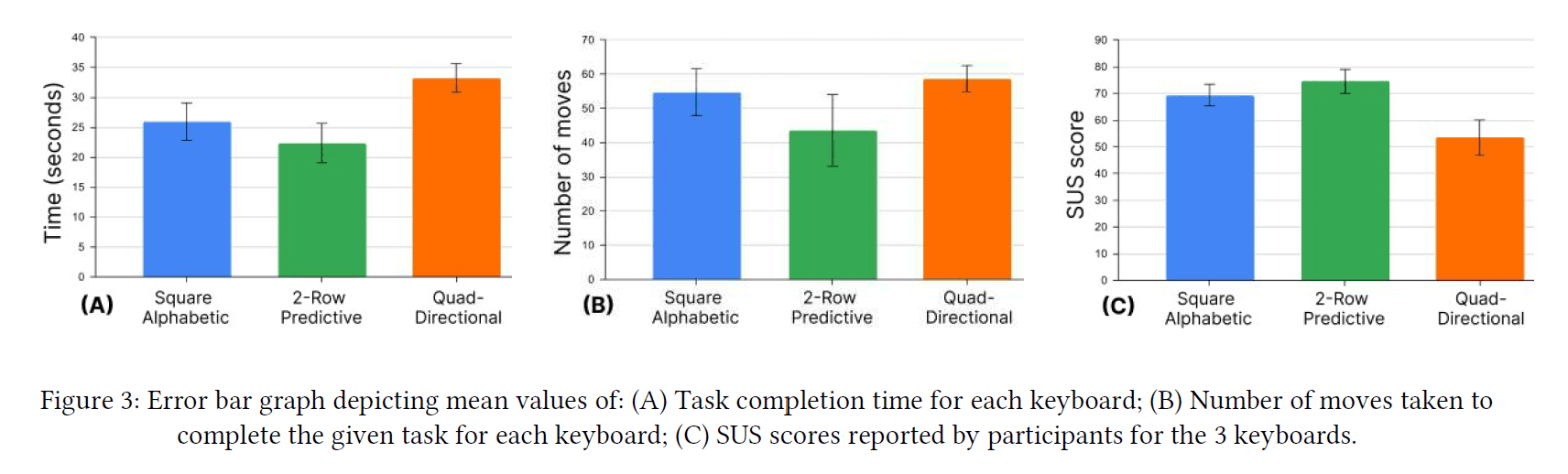
A one-way ANOVA test showed significant differences between the means of the group as determined by the one-way ANOVA (F(2,69) = 13.39, p < 0.001). Pairwise comparisons show that there was a significant difference between the mean task completion time of the Square Alphabetic keyboard and the Quad-Directional keyboard (F(1,46) = 13.11; p < 0.001). There was a significant difference between the mean task completion times of the 2-Row Predictive and Quad-Directional keyboards (F(1,46) = 27.15, p < 0.001) as well. However, there was no significant difference between Square Alphabetic and 2-Row Predictive (F(1,46) = 2.41, p = 0.13). These results indicate that the Square Alphabetic (M = 25.95, SD = 7.79) and 2-Row Predictive (M = 22.34, SD = 8.26) keyboards perform similarly and require less time for task completion than the Quad-Directional (M = 33.23, SD = 6.03) keyboard.

Number of Moves
A one-way ANOVA was applied to the data. There were statistically significant differences between the means of the group as determined by the one-way ANOVA (F(2,69) = 4.18, p = 0.02). Pairwise comparisons show there was a significant difference between the 2-Row Predictive keyboard and the Quad-Directional keyboard (F(1,46) = 7.14, p = 0.01). There was no significant difference between the Square Alphabetic and Quad-Directional keyboard (F(1,46) = 0.98, p = 0.33) and between the Square Alphabetic and 2-Row Predictive keyboard (F(1,46) = 3.09; p= 0.09). These results indicate that the 2-Row Predictive (M = 43.58, SD = 26.04) keyboard performs better and requires less moves to complete the task than the Square Alphabetic (M = 54.75, SD = 17.08) and Quad-Directional (M = 58.71, SD= 9.53) keyboards, which perform similarly.

System Usability Scale and User Preference
System Usability Scale
A one-way ANOVA was applied to the data. There were statistically significant differences between group means as determined by the one-way ANOVA (F(2,69) = 17.43, p < 0.001). Pairwise comparisons show that there was a significant difference between the Square Alphabetic and Quad-Directional keyboard (F(1,46) = 17.41; p < 0.001) and between the 2-Row Predictive keyboard and Quad-Directional keyboard (F(1,46) = 27.06, p < 0.001). There was no significant difference between the Square Alphabetic and 2-Row Predictive keyboards (F(1,46) = 2.87, p = 0.1). The Square Alphabetic (M = 69.38, SD = 10.17) and 2-Row Predictive keyboards (M = 74.58, SD = 11.12) have a score above 68, indicating that they are considered to be above average. In contrast, the Quad-Directional keyboard (M = 53.54, SD = 16.40) is considered below average.
User Preference
19 out of 24 participants said they would prefer using the 2-Row Predictive keyboard.

Errors
In this study, errors are recorded by counting the usage of the backspace key. Cigdem et al. [2021] states that the backspace count indicates the number of errors which has a significant relationship with task completion time and keystroke count. A one-way ANOVA was applied to the data. There were no statistically significant differences between group means as determined by the one-way ANOVA (F(2,69) = 0.54, p = 0.58).

Subjective Analysis
Evaluation of subjective data from the experiment was done in addition to the objective data and the combined metrics have been used together for evaluation in the study.
Experiment Data → Key Insights
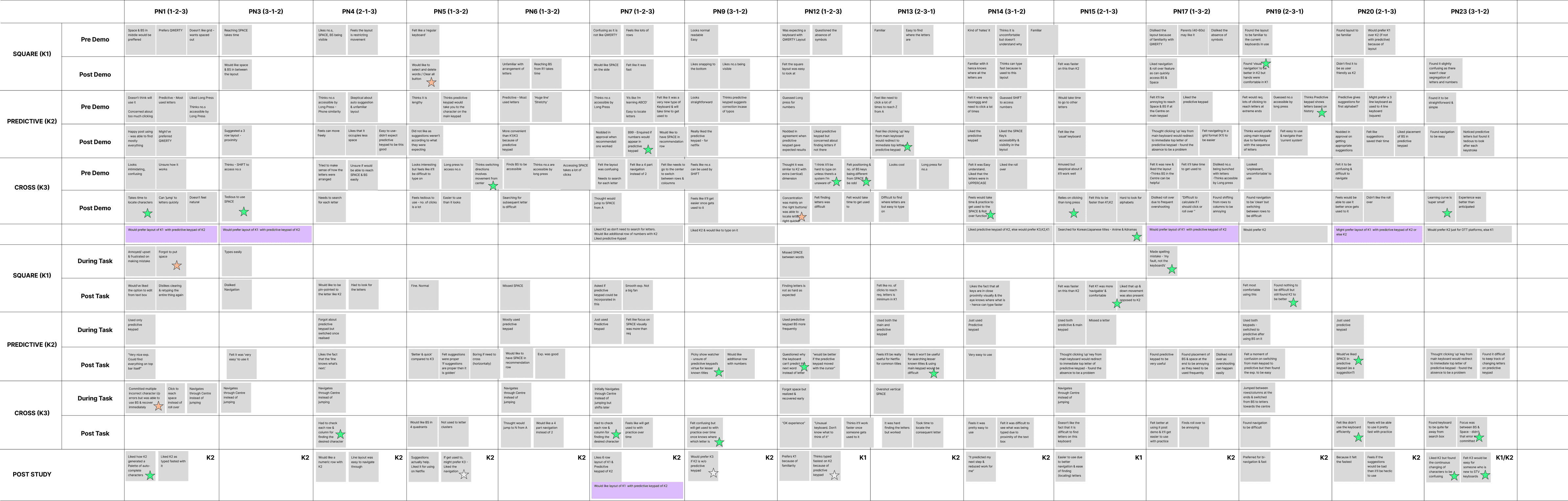
Subjective impressions of data collected from participants were aggregated into a table and organised in accordance with the corresponding keyboards.
Key Insights
Thematically analysing this information resulted in the following subjective insights:
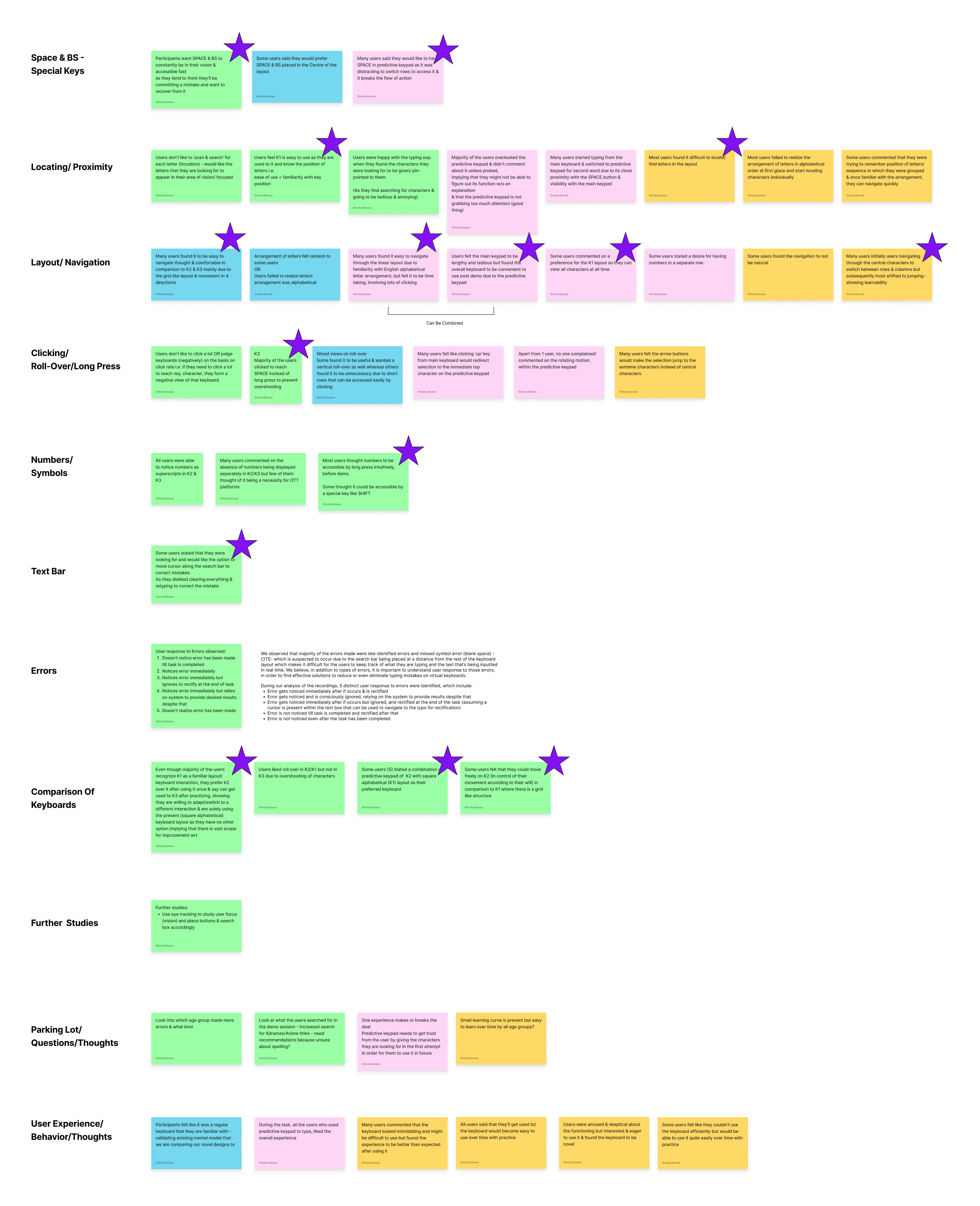
Participants were able to recognize the Square Alphabetic keyboard as the on-screen keyboard used in OTT platforms and stated their familiarity with it from previous experience. Post usage, they commented on the overall experience being “fine”, “like the usual” or “it was ok”.
Their first impressions regarding the 2-Row Predictive keyboard, seemed "tedious" or "lengthy," involving lots of button presses to reach their target character. They were also concerned about being unable to see all characters at once. Post usage, they were satisfied with the experience and stated that they typed a lot faster by using the dynamic row and found the predicted characters to be accurate. Some participants were concerned about the accuracy while searching for lesser-known movie titles as they were not enthusiastic about shifting between the two rows of the keyboard.
The Quad-Directional keyboard was perceived as "intimidating" and "difficult to use" on initial exposure. However, all participants found the keyboard design to be "fun" or "new" and were eager to try it out. Post-usage, the views of the participants changed. They said it was easier to use than anticipated. The majority of the participants stated difficulty in locating characters but found the 4-directional navigation to be simple. They believed that with repeated usage, they would be able to type efficiently on this keyboard.
7 of these participants stated that they solely liked accurate predictions of the dynamic row of the keyboard and would prefer a combination of this dynamic row with the Square Alphabetic or QWERTY keyboard.
Conclusion
The 2-Row Predictive Keyboard outperforms the other two keyboards in task time and the number of moves. This is likely due to the character text prediction technique and dynamic behavior of the characters. The results also suggest that the Square Alphabetic and 2-Row Predictive keyboards perform similarly and reflect better usability than the Quad-Directional keyboard. Both the keyboards have a SUS score above 68, indicating they are above average. Most participants stated preference for using the 2-Row Predictive keyboard even though they were exposed to it for a short duration (<5 mins) compared to the Square Alphabetic keyboard that they had already experienced. This indicates participant willingness to adapt to a new keyboard rather than returning to their habitual keyboard.
We believe that comparison of text input methods adopting from different contexts might not provide the desired result of identification for the best routes for smart TV text input. We conclude that novel text input methods should be designed specifically for the smart TV context taking into consideration the “lean back” environment and they should be compared against existing text input methods to identify optimal directions for smart TV text input.
Project Outcomes
The paper was accepted by the HCI International 2023 conference.
I learnt and applied core HCI research methodologies across study design and evaluation.
I developed proficiency in scholarly academic writing and publication standards.
I picked up and performed statistical analysis to validate experimental outcomes.
I increased the rigor with which I approach empirical research and research-driven conceptualization.
Have a look at my other projects
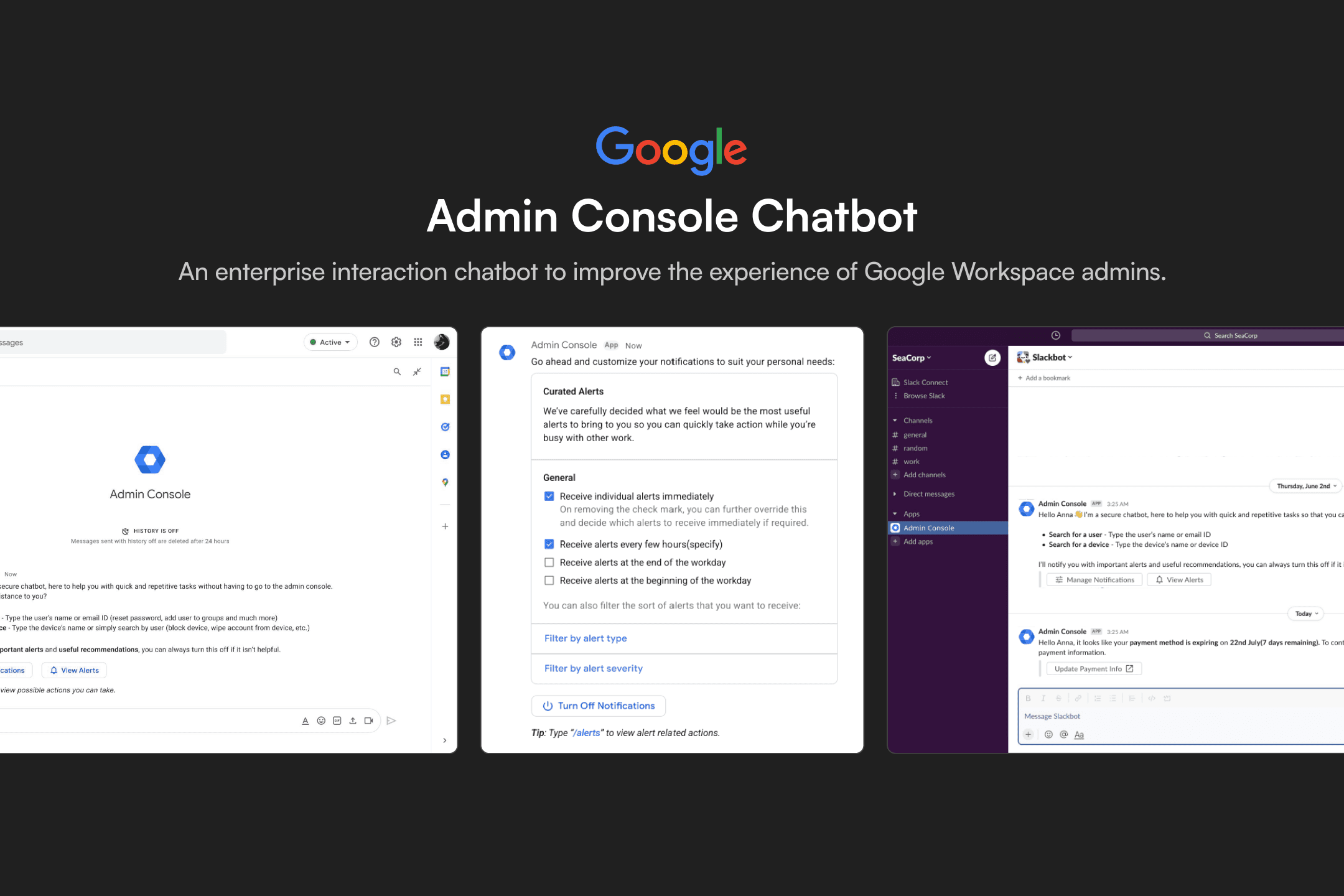
Admin Console Chatbot
UX Design
Interaction Design Intern
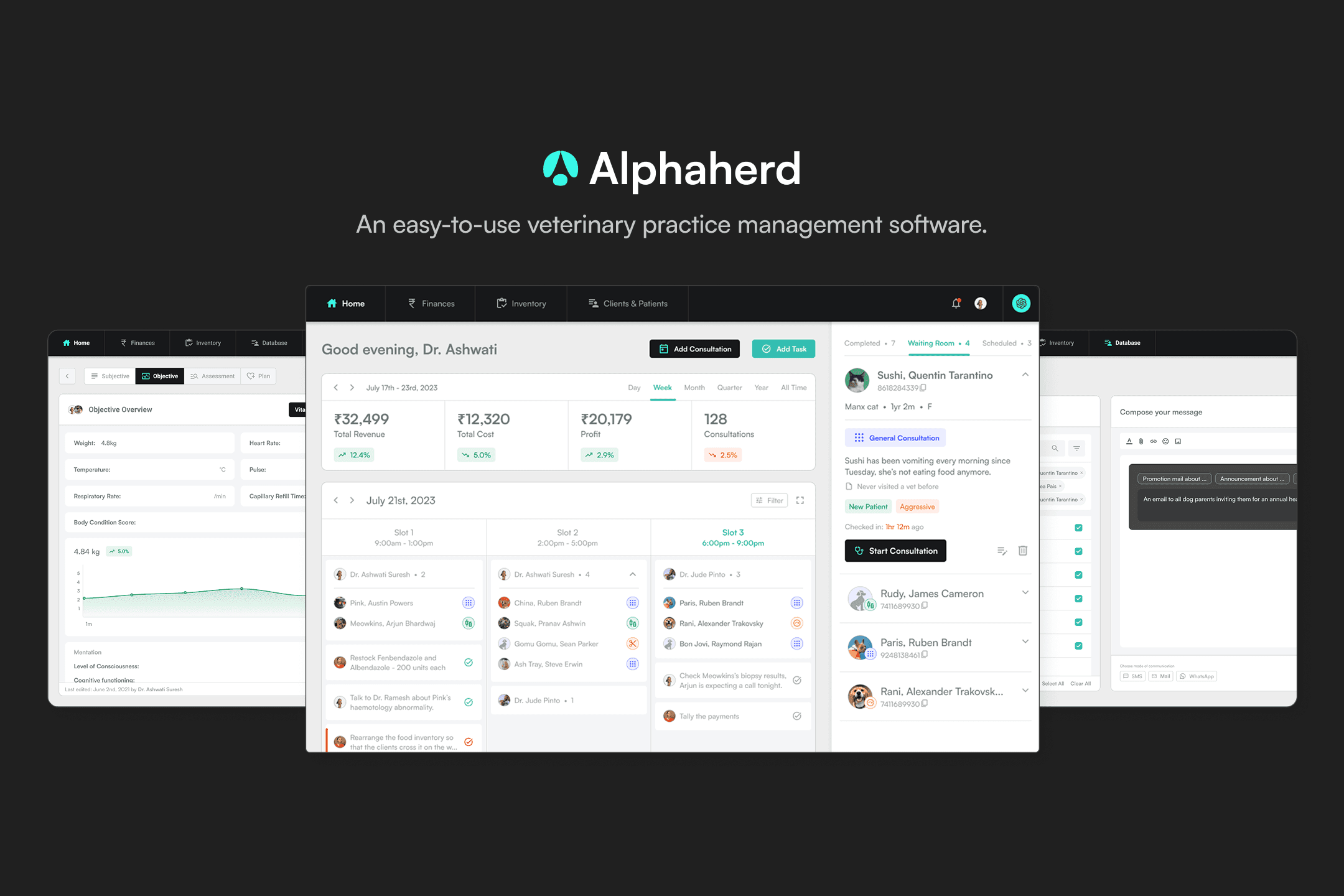
Alphaherd
Entrepreneurial Project
Co-founder
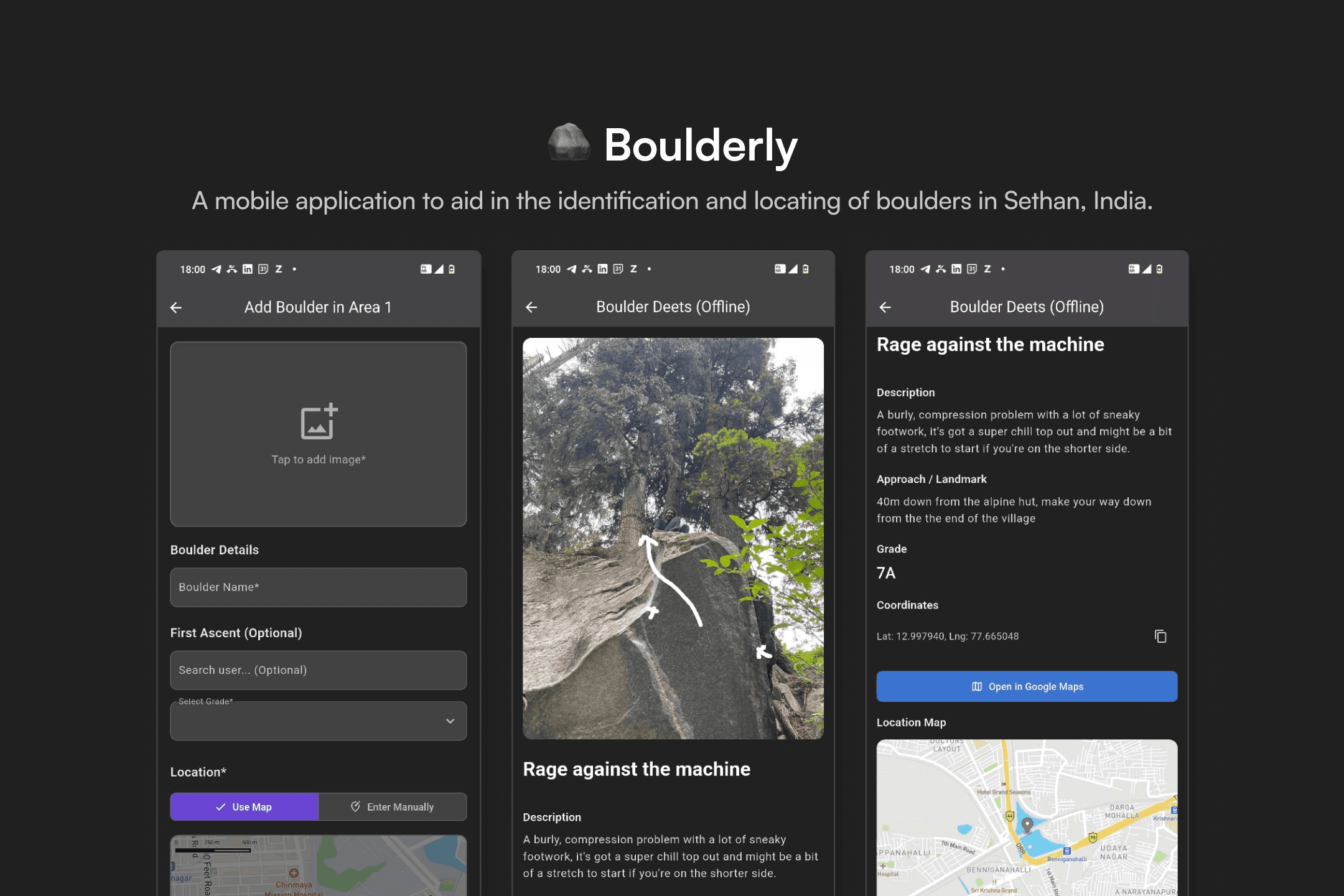
Boulderly
Design for Society
Product Designer & Front-End Developer
Canine First Aid Kit
Tangible Design
Product Designer

Hi, I'm Pranav Ashwin Ramesh
I’m a curious, self-motivated and passionate user experience designer and entrepreneur. Here’s some of my best work grounded in my experience navigating academic research, real-world industry challenges, and entrepreneurial ventures.
Interested in working together?
Shoot me an email if you'd like to chat.